Claude Sonnet 5.5 Built a Kart Racer for My TV: 4 Players, Gamepads
Turbo Kartz: a split-screen kart racer built in Claude Code. 4 tracks, jumps, gamepads on a Sony TV and in the browser. Every prompt inside.
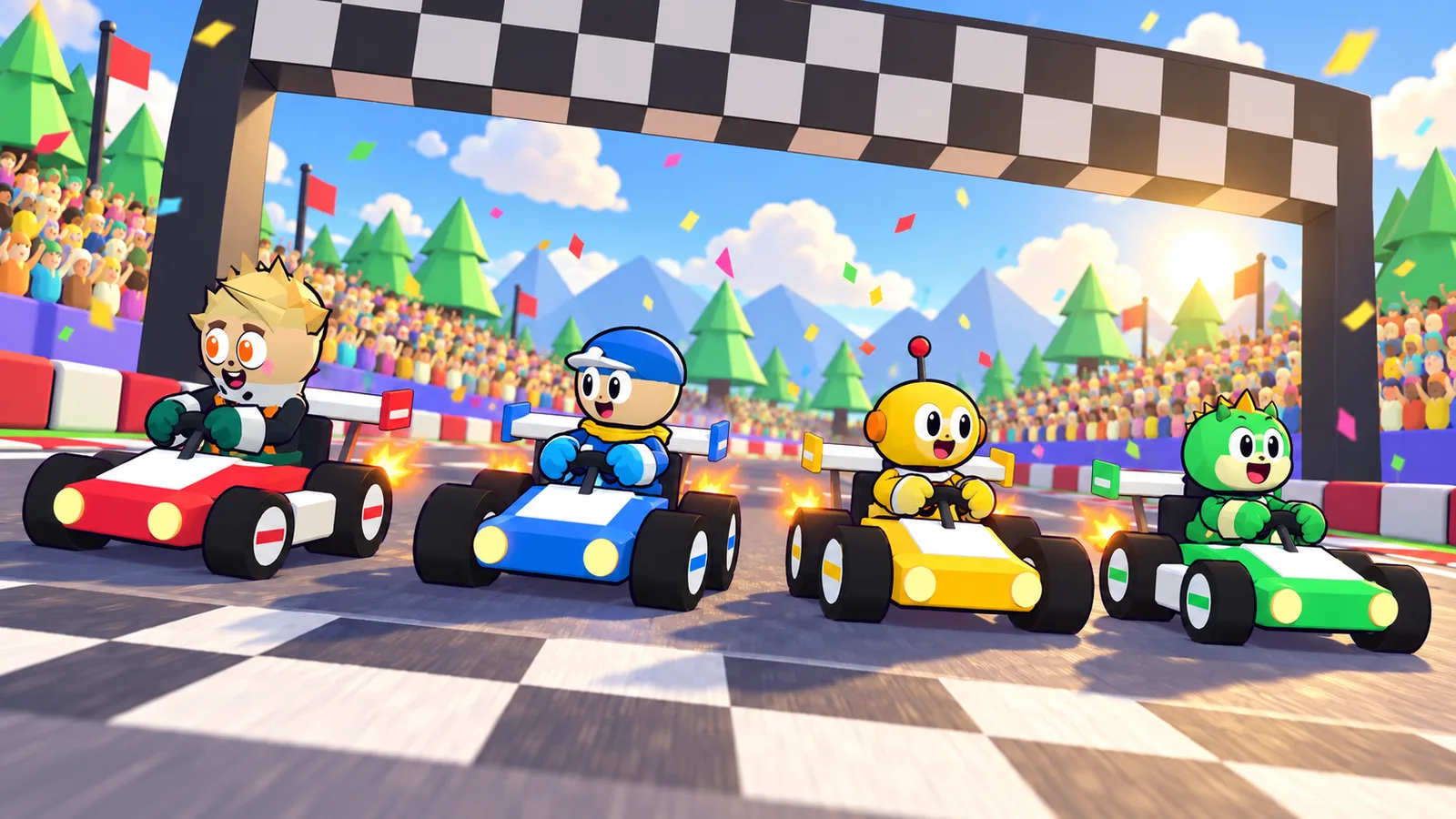
Turbo Kartz is a cartoon kart racer for 1 to 4 players that I built in Claude Code. Claude Sonnet 5.5 built the game in 12 prompts; Claude Opus 5.5 then turned it into something people actually play on a TV, in 8 more. It has 4 tracks, jump ramps with tricks, an EASY mode with smart steering, and split screen with real gamepads, on my Sony BRAVIA and in any browser on a Mac or Windows PC. This post lists every prompt, the bugs that only showed up when someone played it, and the code worth copying.
Play Turbo Kartz ↗All the prompts ↗
Key facts (quick answer)
| Fact | Value |
|---|---|
| Game | Turbo Kartz, a three.js kart racer that plays in the browser |
| Built with | Claude Sonnet 5.5 (game, 12 prompts), Claude Opus 5.5 (TV upgrade, 8 prompts), in Claude Code |
| Players | 1 vs 3 bots, or 2 to 4 in split screen |
| Controls | gamepads (Xbox, PlayStation, Switch Pro), TV remote, keyboard, touch |
| Tracks | 4: Sunny Meadow (837 m), Candy Canyon (1,056 m), Snowy Peaks (1,057 m), Beach Bay (1,115 m) |
| Modes | EASY (smart steering), MANUAL, KIDS (drives itself) |
| Android TV app | 5.2 MB with music, tested on a Sony BRAVIA (Android 12, Google TV) |
| Music and sound | Lyria 3 Pro, $0.08 per call, $0.40 logged |
| Track art | Codex image generation from screenshots of the game |
| Sonnet 5.5 price | $2 / $10 per 1M tokens (Opus 5.5: $4 / $20) |
TL;DR
- The road was invisible. It was built facing down, so the TV skipped drawing it and the track looked like one green field. One line made it grey, and most “I keep hitting the walls” complaints stopped.
- EASY mode: 0 wall hits in 20 seconds of gas with no steering, against 7 in MANUAL.
- Roads 60% wider: 15 m to 24 m; no corner tighter than a 17 m radius.
- Gamepads everywhere: two Switch Pro Controllers on the TV; any standard gamepad in Chrome, Edge, Safari or Firefox.
- Jumps: 2 or 3 ramps per lap, 1.0 to 1.7 s in the air; press any button in the air for a trick boost.
- Sonnet 5.5 costs half of Opus 5.5 and beats it on 1 of 8 benchmarks (Terminal-Bench 4.0).
What did I ask? The 20 prompts
I fixed typos and trimmed a few for length. The full list, with the music and art prompts, is on the prompts page.
Part 1, the game, with Claude Sonnet 5.5:
- Create a 3D animation using HyperFrames and Three.js for a cartoon kart racing intro, a game motion graphics trailer.
- Make it a 2.5D cartoon, 3D-ish game.
- It needs improvement on the hands holding the wheel.
- Also add a fully playable stage demo.
- You can do better in terms of graphics. We need chunky, colourful cartoon characters.
- We need a way to turn this into a game ready for Android.
- Car selector with powers.
- Fix the stadium collisions, and the arrival.
- The Blaze character has only one eye. Kinda scary.
- Adapt the game to the D-pad remote and push it to my Sony Bravia TV as an APK.
- Make it easy and fun to play with the TV remote, for kids.
- Add Bluetooth controller pairing and split screen.
Part 2, making it fun to play, with Claude Opus 5.5:
- On the TV it plays alone. Fix the split screen: pick players and detect the gamepads.
- Add an easy mode for solo play. It is too easy to hit the sides.
- Let each player pick a character with their own remote or gamepad, coloured differently.
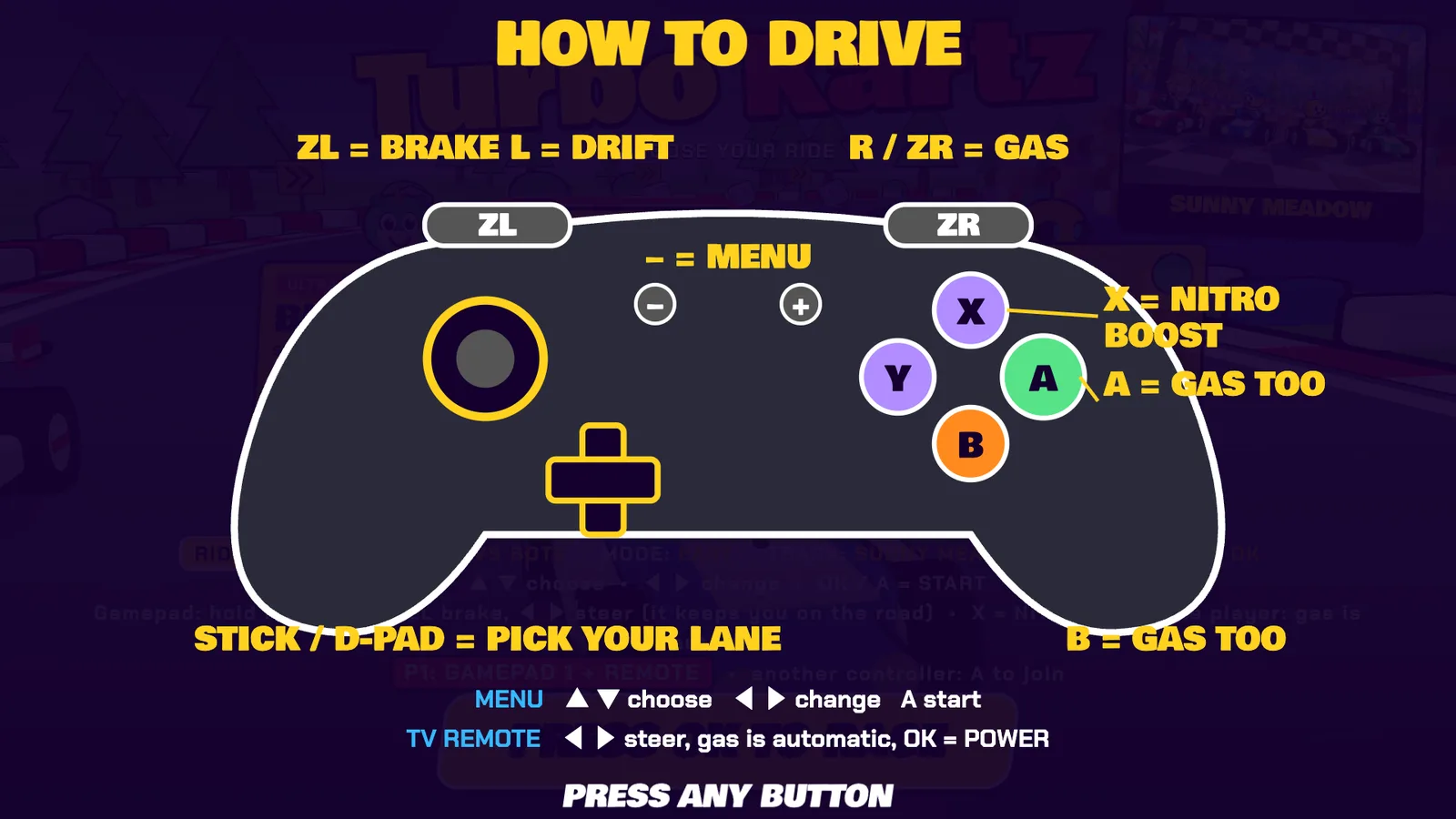
- Add a gamepad tutorial. Easy buttons: triggers to drive, X for a nitro boost.
- Make the cars able to jump and fly over ramps.
- Add cool background music and sound effects with Lyria.
- Add more tracks. Use Codex to generate the images.
- Make it playable online with gamepads and split screen, on Mac and Windows.
Two tools in there, in plain words. Three.js is a free JavaScript library that draws 3D scenes in a web page. HyperFrames is a free tool that records a web page as a video, frame by frame; it made the trailer and the launch video.
What was wrong the first time it was really played?
Four things, and none of them showed up in my own tests before.
| What broke | Why | Fix |
|---|---|---|
| Players kept hitting the sides | the road was a flat ribbon facing down, so the GPU culled it: the track looked like grass | draw every flat road ribbon from both sides |
| Split screen never started | the first gamepad became player 1, the same player as the remote | each device owns a player; a menu row picks 1 to 4 players |
| The 2nd controller stopped working | a Switch Pro Controller that sleeps comes back with a new device id, and the 4 player slots ran out | reuse the lowest free slot, forget a controller when it disconnects |
| The gamepad could not pick a ride | the menu only listened to buttons, not to stick or D-pad motion | stick and D-pad flicks act like arrow presses |
The first one is my favourite. Every screenshot looked fine on a Mac, because the camera there never looked at the road from the angle that hides it. On the TV it was one big green field, and of course everyone drove into the walls.
How does EASY mode steer for you?
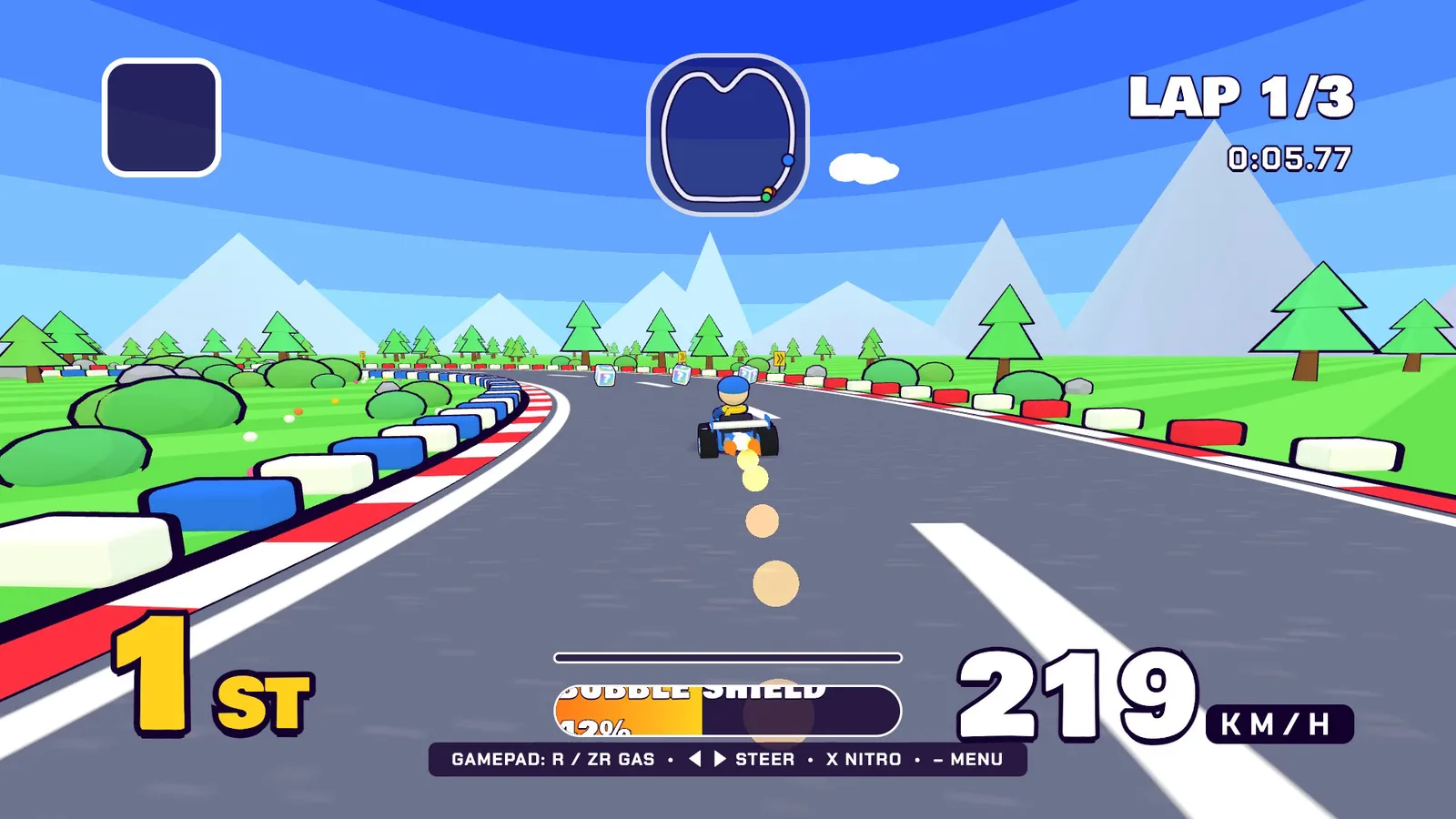
You still steer: pushing left or right moves you across the road right away. When you let go, the kart follows the road in the lane you are in, and it never aims closer than 2.3 m to the edge. Walls you still touch only take 4% of your speed instead of 10%.
| Test: 20 s of gas, no steering | EASY | MANUAL |
|---|---|---|
| Wall touches | 0 | 7 |
| Furthest from the road centre | 1.1 m | 10.5 m |
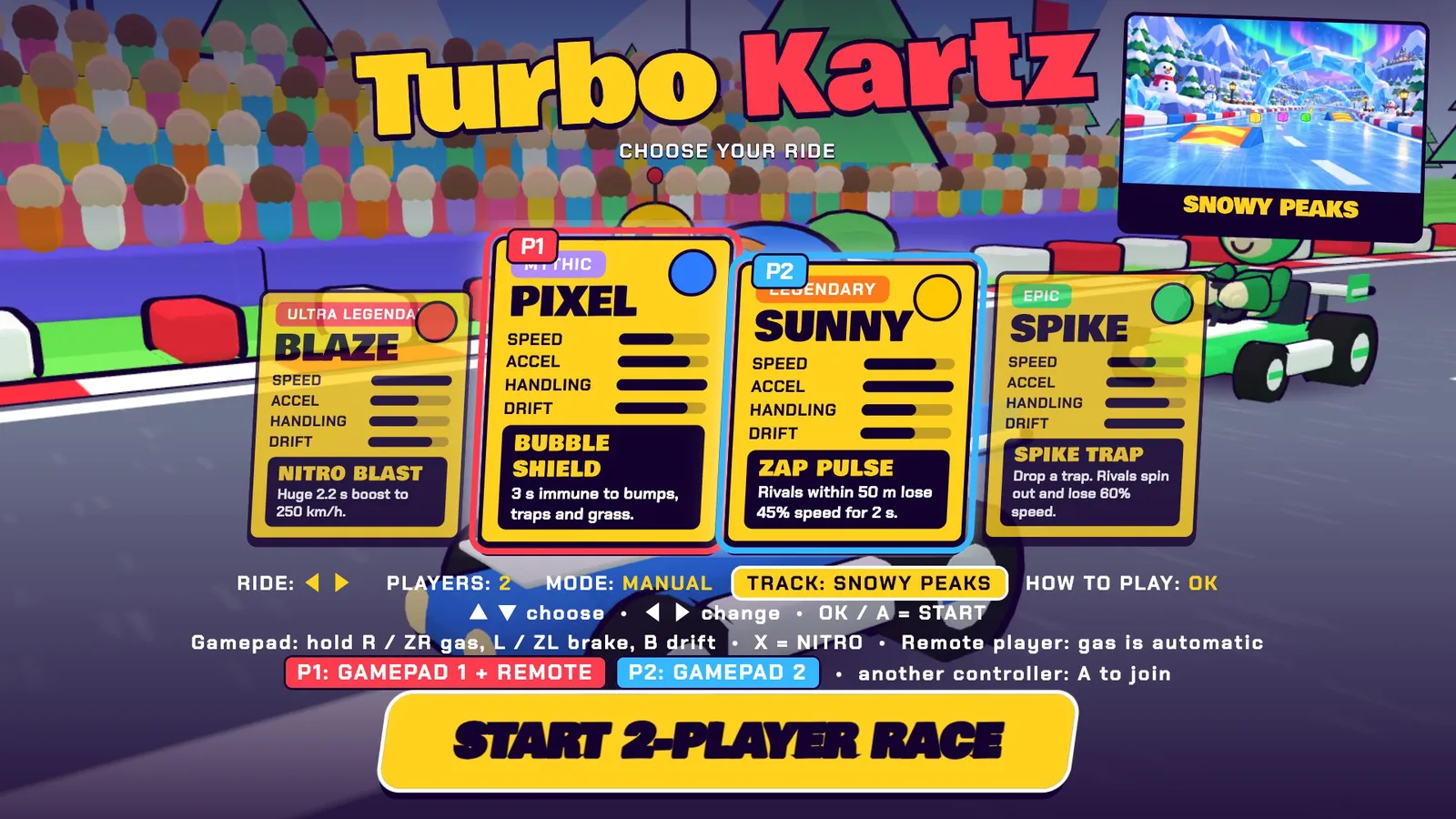
The menu is three rows you move through with up and down: ride, players (1 vs bots up to 4), mode (EASY, MANUAL, KIDS), track. Every remote or gamepad has its own cursor, so player 2 picking a kart never changes player 1’s row.
How do jumps work?
Ramps sit on the three straightest stretches of each track, measured from the track’s curvature. The kart climbs the wedge, leaves the top edge with the speed it climbed at plus a small pop, and lands 1.0 to 1.7 s later. Press any button in the air for a trick: a 360 spin and a 1 second boost when you land. Launch speed is capped, because the first version threw the kart 9.75 m into the air on the steepest ramp.
Which tracks are there?
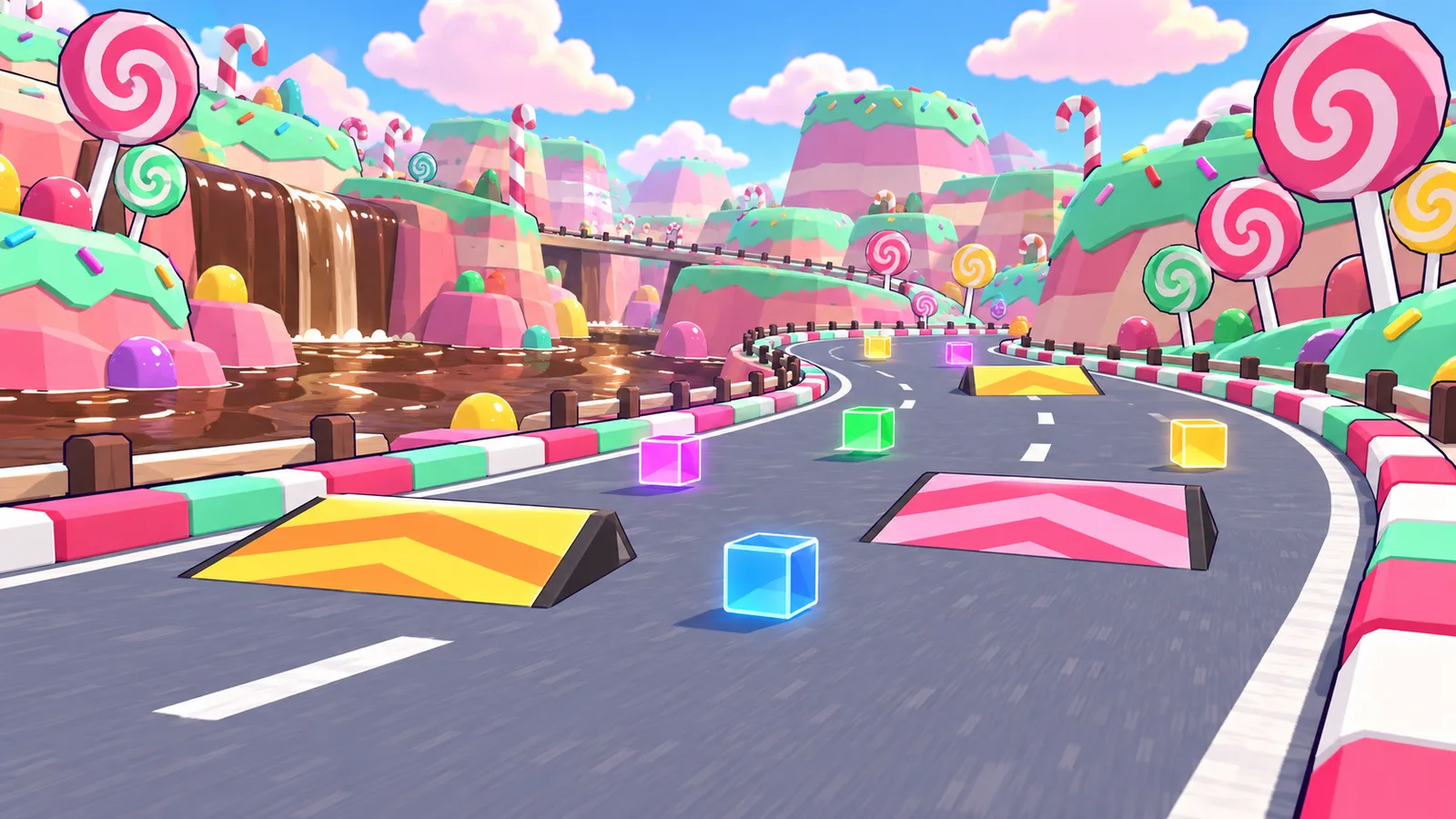
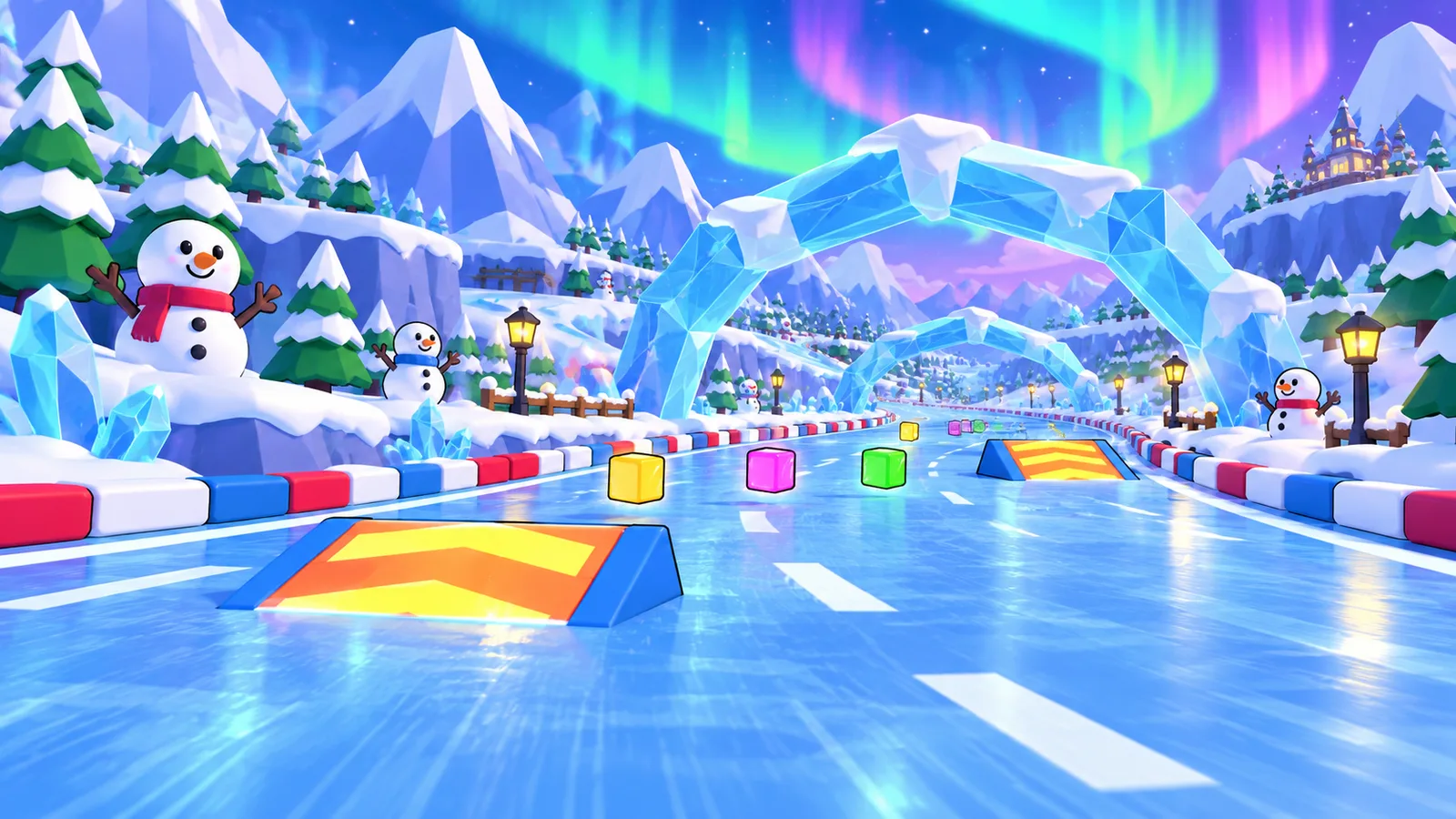
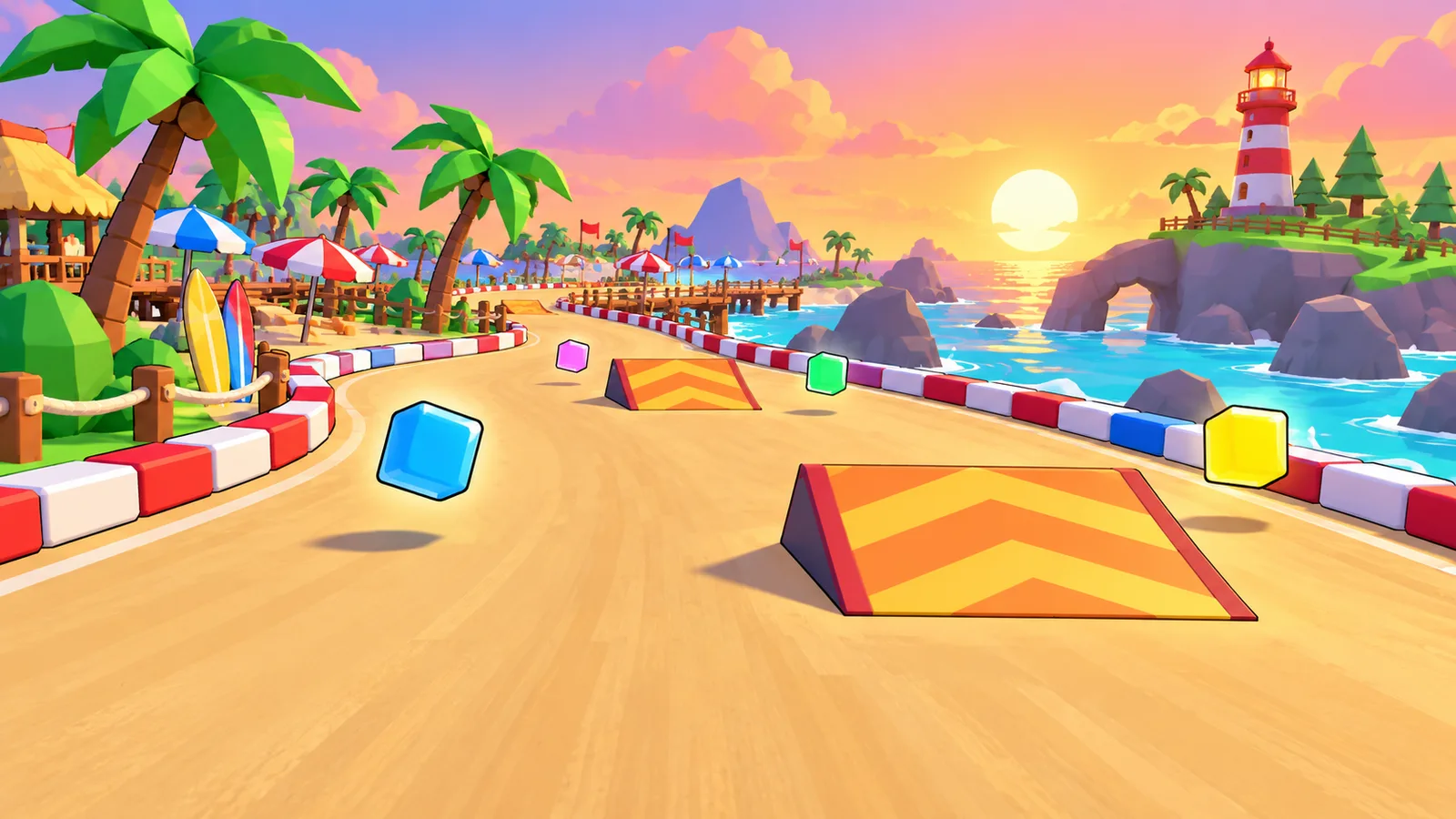
Four, each with its own road shape, colours and ramps. Codex painted the picture for each one in the menu, from screenshots of the game.
| Track | Length | Tightest corner | Look |
|---|---|---|---|
| Sunny Meadow | 837 m | 26 m radius | the original: green hills, grandstands |
| Candy Canyon | 1,056 m | 24 m radius | pink sky, candy road, chocolate lake |
| Snowy Peaks | 1,057 m | 17 m radius (a hairpin) | snow, frozen lake |
| Beach Bay | 1,115 m | 29 m radius | sunset, sand, turquoise water |
Every track passed the same test before it shipped: a lap in EASY mode with gas held and no steering, 0 wall hits. The first Candy Canyon and Snowy Peaks failed it; their tightest corners (13.6 m and 11.1 m) were sharper than half the 24 m road, so the road folded over itself. I widened them.
How does split screen with gamepads work?
Every controller that presses A joins as the next player, up to four, and the screen splits in halves or quarters. Each player has their own camera, colour, position and power meter, and their half of the screen is labelled with the player number and the controller.
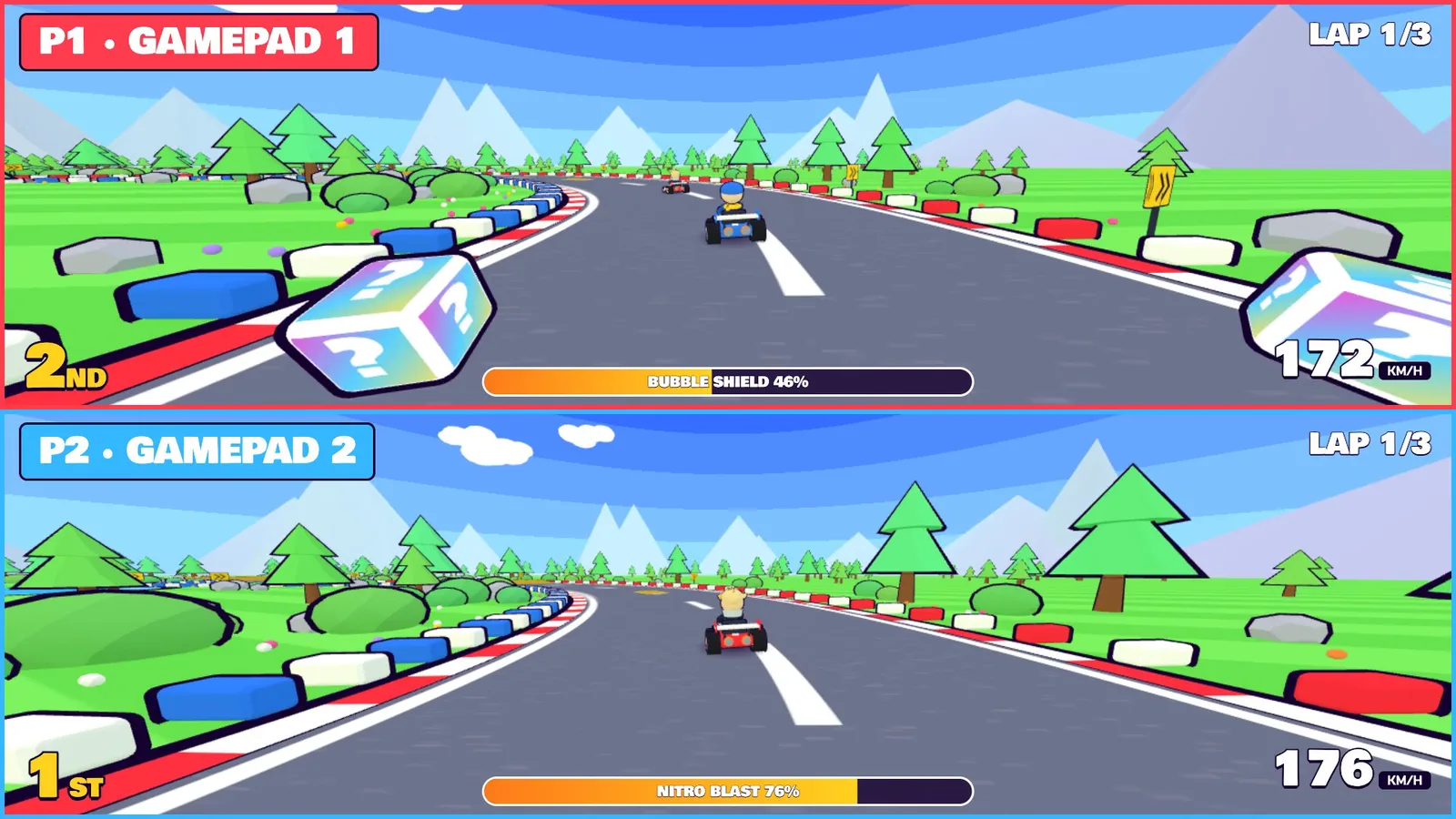
On the TV, the Android app gives each gamepad a player slot and forwards its buttons and stick to the game. This is the part worth copying if you wrap a web game for Android TV:
/** Player slot for a gamepad (or a real keyboard), -1 for the TV remote. Lowest free slot, so a
 *  controller that sleeps and reconnects with a new device id does not use up the 4 slots. */
private int padSlot(InputEvent e) {
    int src = e.getSource();
    boolean pad = (src & InputDevice.SOURCE_GAMEPAD) == InputDevice.SOURCE_GAMEPAD
            || (src & InputDevice.SOURCE_JOYSTICK) == InputDevice.SOURCE_JOYSTICK;
    if (!pad) return -1;
    int id = e.getDeviceId();
    int i = padSlots.indexOfKey(id);
    if (i >= 0) return padSlots.valueAt(i);
    for (int slot = 0; slot < 4; slot++) {
        if (padSlots.indexOfValue(slot) < 0) { padSlots.put(id, slot); return slot; }
    }
    return -1;
}

@Override public void onInputDeviceRemoved(int id) {   // InputManager.InputDeviceListener
    int i = padSlots.indexOfKey(id);
    if (i >= 0) {
        int slot = padSlots.valueAt(i);
        padSlots.delete(id);
        web.evaluateJavascript("window.__padGone && window.__padGone(" + slot + ")", null);
    }
}
In the browser the same game reads the standard Gamepad API. Two details matter. A browser only shows a controller after its first button press, so the menu says “press A on each one to join”. And on the standard layout the D-pad arrives as buttons 12 to 15, not as an axis, or every menu press moves twice.
Where do the music and art come from?
The music is Lyria 3 Pro, Google’s music model, at $0.08 per call: a 150 BPM race loop and a 118 BPM menu loop, each cut to a seamless loop. It also made the jump, landing and boost sounds, though it is better at music than at short effects: I had to cut each effect down to its loudest half second. The prompts are on the prompts page.
The track pictures and the starting-grid poster are Codex image generation, given screenshots of the real game so the characters stay the same.
Sonnet 5.5 vs Opus 5.5: does the cheaper model win?
Once, on the benchmark closest to what this game needed. Sonnet 5.5 scores 70.6% on Terminal-Bench 4.0, a test of coding in a terminal, against 66.4% for Opus 5.5. Opus leads the other seven.
| Benchmark (Anthropic, 28 Sep 2026) | Sonnet 5.5 | Opus 5.5 | Gap |
|---|---|---|---|
| Terminal-Bench 4.0 | 70.6% | 66.4% | +4.2 |
| FrontierCode 1.1 (Main, Max) | 46.2% | 54.4% | -8.2 |
| CursorBench 4.0 | 55.5% | 57.8% | -2.3 |
| GDPval-AA v2.1 | 1844 | 1846 | -2 |
| AA-Briefcase v1.1 | 1811 | 1822 | -11 |
| Humanity’s Last Exam (with tools) | 64.5% | 67.7% | -3.2 |
| OSWorld 2.1 (partial) | 80.1% | 81.8% | -1.7 |
| Chartography (no tools) | 61.6% | 64.4% | -2.8 |
| Price per 1M tokens | Sonnet 5.5 | Opus 5.5 |
|---|---|---|
| Input | $2 | $4 |
| Output | $10 | $20 |
| Cache reads | $0.20 | $0.20 |
| Cache writes | $2.50 | $5 |
Caveats
- Two models. Sonnet 5.5 built the game; the TV upgrade, EASY mode, jumps, tracks and web gamepads were Opus 5.5. The title is about the build; this post is about both.
- Frame rate on the TV. My first measurement on the BRAVIA was 15 fps during a race. Two full-screen effects cost about 10 fps; they are off on TV now, and the resolution adapts when the frame rate drops. I have not re-measured the final build on the TV yet.
- Browser gamepads were simulated. The Chrome and Safari tests used two fake standard gamepads through the real Gamepad API. Real controllers were tested on the TV app.
- Benchmarks are vendor-reported. I did not rerun any of them.
- No build cost. I did not log the tokens, so there is no dollar figure for the code.
My take
The best prompt in this whole project was not mine. It was the first real play test: “it plays alone”, “it keeps hitting the walls”. No amount of my own testing found the invisible road, because I was testing what I expected to see. Ship early, hand the controller to someone else, and paste their complaints into the prompt box word for word.
Sources
- Claude Sonnet 5.5, Anthropic, 28 September 2026: https://www.anthropic.com/claude-sonnet-5-5 (benchmark and price numbers; vendor-reported)
- Lyria 3 Pro pricing, $0.08 per call: Google AI Studio, checked 29 September 2026
- three.js: https://threejs.org
- HyperFrames: https://hyperframes.heygen.com
- Wall hits, track measurements, jump times, gamepad tests and TV frame rate: my own measurements, 1 and 2 October 2026.
Independent tutorial by Anass Kartit, kartit.net. Game built with Claude Sonnet 5.5 and Claude Opus 5.5. Not affiliated with Anthropic or Sony. Video made with HyperFrames.
Newsletter
Get the next post and game in your inbox
One email when I publish something new: measured write-ups on AI, local models and cloud, plus games like NEON RUN.