Nano Banana 2.1 vs GPT Image 2.5: 8 Prompts, Real Cost per Image
Nano Banana 2.1 cost me $0.042 a picture, GPT Image 2.5 $0.033. Same 8 prompts, 5 models, first picture only: OpenAI won 3 to 2. Prompts, costs, code.
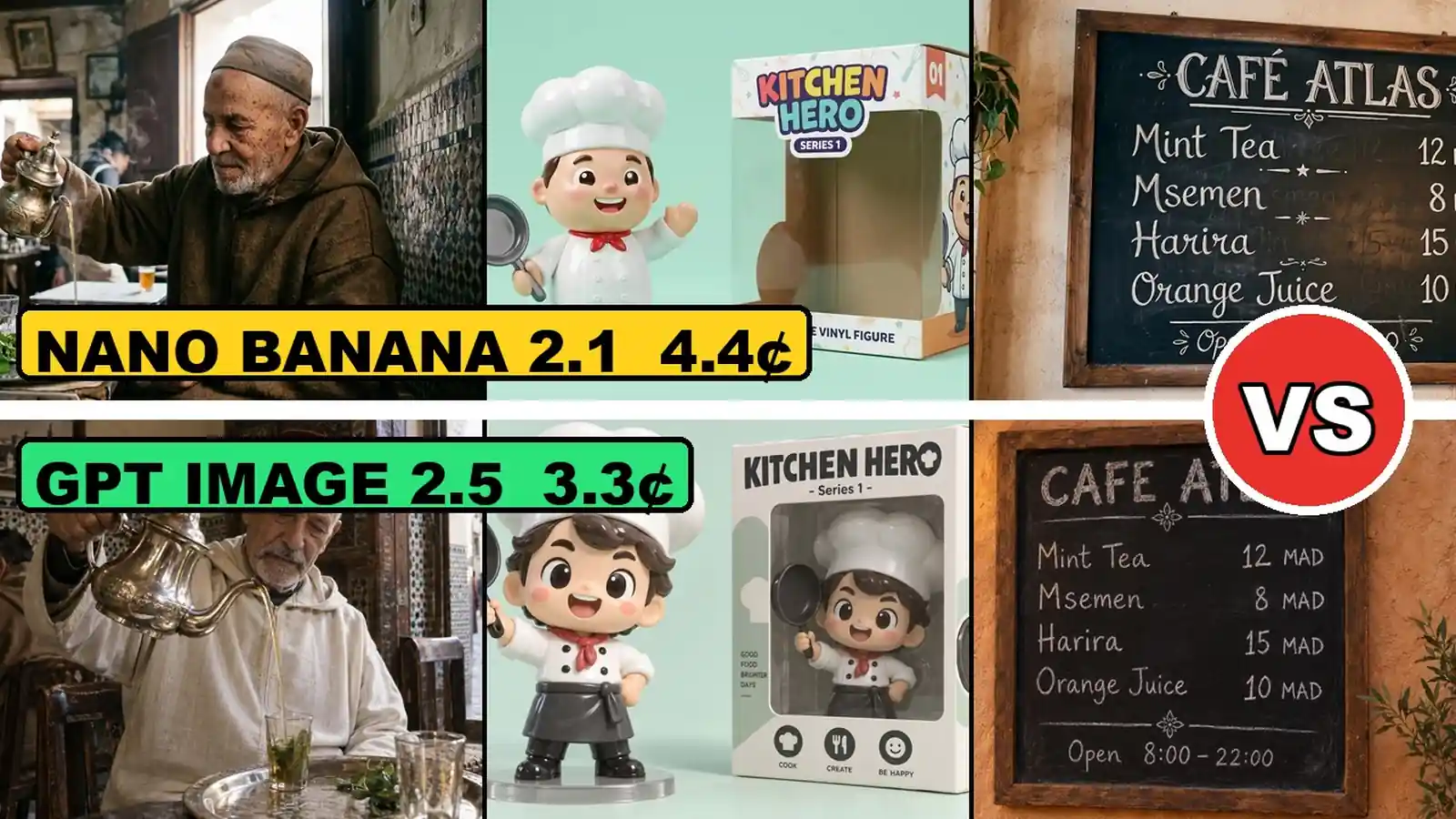

Nano Banana 2.1 (Google) and GPT Image 2.5 (OpenAI) are the two newest AI image models. On 8 October 2026 I gave them, plus Nano Banana 2, Nano Banana Pro and both GPT Image 2.5 versions (Sunburst and Flare), the same 8 prompts and kept the first picture only. Nano Banana 2.1 cost me $0.0418 a picture at 1K. GPT Image 2.5 cost $0.0326 at quality high, for a bigger picture. On the scoreboard OpenAI won 3 to 2, but the best model depends on the job. This post has every prompt word for word, the cost and time of every picture, the price of each quality level, and the API calls I used.
Watch the video: Nano Banana 2.1 vs GPT Image 2.5 on YouTube.
Key facts (quick answer)
| Fact | Measured result |
|---|---|
| Test date | 8 October 2026, one run per prompt, first picture only |
| Models | Nano Banana 2.1, Nano Banana 2, Nano Banana Pro, GPT Image 2.5 Sunburst, GPT Image 2.5 Flare |
| How I called them | Google models through the Gemini API (Google AI Studio key), OpenAI models through OpenRouter POST /api/v1/images |
| Nano Banana 2.1, 1K, 16:9 | $0.0418 a picture, 14 s (thumbnail prompt) |
| GPT Image 2.5, high, 16:9 | $0.0326 a picture, Sunburst 30 s, Flare 16 s (thumbnail prompt) |
| Picture size | Google 1K: 1376x768. GPT Image 2.5: 1536x864 |
| Cheapest picture | GPT Image 2.5 at low: $0.0039 |
| Most expensive picture | Nano Banana Pro at 4K: $0.2443 |
| Scoreboard | OpenAI 3, Google 2, 3 challenges with no point |
| Total spent on the tests | $4.36 over 66 calls |
TL;DR
- Price: GPT Image 2.5 at high cost $0.0326 a picture. Nano Banana 2.1 cost $0.0418, Nano Banana 2 $0.0684, Nano Banana Pro $0.1389 (all 1K, same prompt).
- Speed: Flare took 16.9 s on average, Sunburst 29.9 s, for the same price. Nano Banana 2 was the fastest at 10.3 s.
- Scoreboard: OpenAI 3 (toy, poster, outfit), Google 2 (real person, thumbnail), no point on 3 challenges.
- Text: all 5 models wrote a 5-line chalk menu with every letter right.
- Edits: on OpenAI’s own test photo, each model broke a different rule. Google changed the skin tone, OpenAI painted a new background.
- Total bill: $4.36 for 66 pictures, including 12 I threw away.
How much does each picture cost? Nano Banana 2.1 vs GPT Image 2.5
GPT Image 2.5 was the cheapest at the settings I used, by about a cent a picture.
| Model | Model id | Thumbnail prompt (16:9) | Average of 6 text prompts | Average of 2 photo edits (3:4) |
|---|---|---|---|---|
| Nano Banana 2.1 | gemini-nano-banana-2.1 | $0.0418, 13.9 s | $0.0438, 15.0 s | $0.0420 |
| Nano Banana 2 | gemini-3.1-flash-image | $0.0684, 9.8 s | $0.0685, 10.3 s | $0.0681 |
| Nano Banana Pro | gemini-3-pro-image | $0.1389, 16.5 s | $0.1403, 17.2 s | $0.1385 |
| GPT Image 2.5 Sunburst | openai/gpt-image-2.5-sunburst | $0.0326, 30.3 s | $0.0326, 29.9 s | $0.0608 |
| GPT Image 2.5 Flare | openai/gpt-image-2.5-flare | $0.0326, 15.5 s | $0.0326, 16.9 s | $0.0608 |
Google settings: 1K, aspect ratio 16:9 (3:4 for the edits). OpenAI settings: quality high, aspect ratio 16:9 (3:4 for the edits).
The two columns of money do not come from the same kind of source, and that matters:
- Google (computed, not billed): the Gemini API returns token counts in
usageMetadata. I multiplied them by the list price I read on 8 October 2026. Per 1M tokens (input / text and thinking output / image output): Nano Banana 2.1 $1.50 / $7.50 / $30, Nano Banana 2 $0.50 / $3.00 / $60, Nano Banana Pro $2.00 / $12.00 / $120. Thinking tokens are included. This is not an amount Google charged me. - OpenAI (charged): OpenRouter returns what it charged in
usage.cost. That is the number in the table.
Here is how one Nano Banana 2.1 picture adds up (thumbnail prompt): 54 input tokens x $1.50 + 1,085 text and thinking tokens x $7.50 + 1,120 image tokens x $30, per million, equals $0.0418. The image tokens alone are $0.0336. The thinking is the rest.
Edits cost more on GPT Image 2.5 because the reference photo is billed as input ($0.012 of the $0.061) and the 3:4 picture used 1,629 image tokens against 1,078 at 16:9. On Nano Banana 2.1 an edit cost about the same as a new picture.
How much does quality or resolution change the price?
The same thumbnail prompt, run at every size or quality level, on 8 October 2026.
| Model | Setting | Picture size | Cost | Time |
|---|---|---|---|---|
| Nano Banana 2.1 | 1K / 2K / 4K | 1376x768 / 2752x1536 / 5504x3072 | $0.042 / $0.060 / $0.122 | 13.9 / 19.7 / 29.2 s |
| Nano Banana 2 | 1K / 2K / 4K | 1376x768 / 2752x1536 / 5504x3072 | $0.068 / $0.102 / $0.152 | 9.8 / 15.8 / 21.2 s |
| Nano Banana Pro | 1K / 2K / 4K | 1376x768 / 2752x1536 / 5504x3072 | $0.139 / $0.138 / $0.244 | 16.5 / 20.4 / 28.8 s |
| GPT Image 2.5 Sunburst | low / medium / high / xhigh / max | 1536x864 at every level | $0.0039 / $0.0087 / $0.0326 / $0.0578 / $0.1297 | 13.9 / 16.7 / 30.3 / 42.0 / 74.5 s |
| GPT Image 2.5 Flare | low / medium / high / xhigh / max | 1536x864 at every level | $0.0039 / $0.0087 / $0.0326 / $0.0578 / $0.1297 | 10.6 / 11.2 / 15.5 / 23.1 / 32.7 s |
Two things surprised me. On Google, a bigger size means more pixels. On GPT Image 2.5, every quality level returned the same 1536x864 file: you pay for detail, not for pixels. And Nano Banana Pro at 2K cost a tiny bit less than at 1K on this run ($0.1379 against $0.1389), because it thought for fewer tokens.
Which model won each challenge? The scoreboard
OpenAI won 3 to 2. Three challenges gave no point.
| # | Challenge | Point | Why |
|---|---|---|---|
| 1 | Ad photo | No point | All five look like real ads. Nano Banana Pro had the most real-looking water drops but cost 14 cents. OpenAI’s cost about 3 cents and added a whole lake. Pro wins on looks, OpenAI on price. |
| 2 | Real person | Google’s three look like real film photos, with wrinkles and soft window light. OpenAI’s are brighter, and both put a red hat on his head that I never asked for. | |
| 3 | YouTube thumbnail | All five spelled the words right. Nano Banana 2 added a price I never asked for, Flare drew real company logos on the laptop, Pro made it black and white. Nano Banana 2.1 was the cleanest, for 4 cents. | |
| 4 | Plastic toy | OpenAI | Pro’s toy came out matte, not shiny. Nano Banana 2.1 made the box empty. Both OpenAI pictures put the same shiny chef inside the box, like a real toy store. |
| 5 | Writing | No point | All five got every letter of the 5-line menu right. Nano Banana 2.1 even added the French accent on CAFE. |
| 6 | School poster | OpenAI | Every word right again. Nano Banana 2 made a skinny poster in the middle, Flare added extra sentences, Sunburst did exactly what I asked. |
| 7 | Fix an old photo | No point | All kept who he is. Google’s three kept the background but made his skin darker. Both OpenAI models kept his skin color but painted a new blue background. |
| 8 | New outfit | OpenAI | All five did it and kept his face and hands. OpenAI’s two look the most like a real tuxedo, with the round collar and a pocket square, for 6 cents. Nano Banana 2.1 did it for 4 cents with a simpler collar. |
| Total | OpenAI 3, Google 2 |
The 8 prompts, word for word
Same words for all five models. Challenges 7 and 8 also send one reference photo: OpenAI’s own test photo from the ChatGPT Images 2.5 launch page.
| # | Challenge | Prompt |
|---|---|---|
| 1 | Ad photo | Commercial product photo of a matte black wireless earbuds case standing on a wet dark slate stone, a few water droplets on the case, soft morning side light, shallow depth of field, premium tech ad, no text. |
| 2 | Real person | Candid documentary photo of an elderly man pouring mint tea from a silver teapot into a small glass, in a traditional Fes medina cafe, natural window light, shot on a 35mm camera, real skin texture and wrinkles, slight film grain. |
| 3 | YouTube thumbnail | YouTube thumbnail: a surprised young developer with his hands on his head next to a laptop, a huge glowing red price tag reading “$0.03”, big bold yellow text at the top “HALF PRICE?”, high contrast, clean dark background, readable on a phone. |
| 4 | Plastic toy | A glossy 3D vinyl toy figure of a cheerful chef holding a frying pan, soft studio lighting, pastel mint background, next to its collectible box with the printed label “KITCHEN HERO - Series 1”. |
| 5 | Writing | Photo of a hand-lettered chalkboard menu on a cafe wall, title “CAFE ATLAS”, with exactly these lines: “Mint Tea 12 MAD”, “Msemen 8 MAD”, “Harira 15 MAD”, “Orange Juice 10 MAD”, “Open 8:00 - 22:00”. Chalk texture, warm light. |
| 6 | School poster | Clean flat infographic poster titled “How a Solar Panel Works” with 4 numbered steps and arrows: 1 “Sunlight hits the cells”, 2 “Electrons start moving”, 3 “Inverter makes AC power”, 4 “Your home uses it”. White background, blue and yellow accents. |
| 7 | Fix an old photo | Restore this photo of an old printed school portrait: remove the glare, the colour cast, the paper texture and the creases, and recover sharp natural detail. Keep the child’s face, expression, pose, clothes and the studio background exactly the same. Output only the restored portrait, filling the frame. |
| 8 | New outfit | Change his outfit to a cream white tuxedo with black satin lapels, a white shirt and a black bow tie. Keep his face, expression and pose, the photo print, the hand holding it and the room behind it exactly the same. |
What did each model get right and wrong?
Below are the most telling pairs. Every picture is the first one the model returned, not edited. The labels show what that exact picture cost.
Real person: who added a hat?
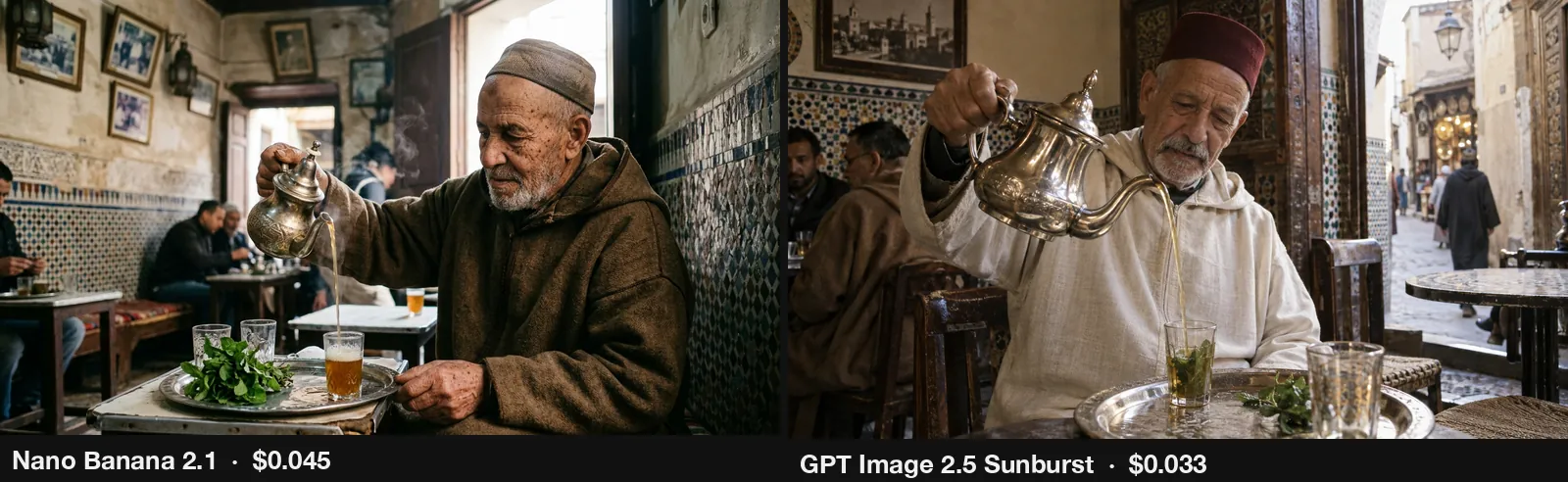
Nano Banana 2.1 gave me a film photo with real wrinkles and window light. GPT Image 2.5 Sunburst is brighter and put a red hat (a fez) on him. Flare did the same. I never asked for a hat. Point for Google.
YouTube thumbnail: the cleanest one
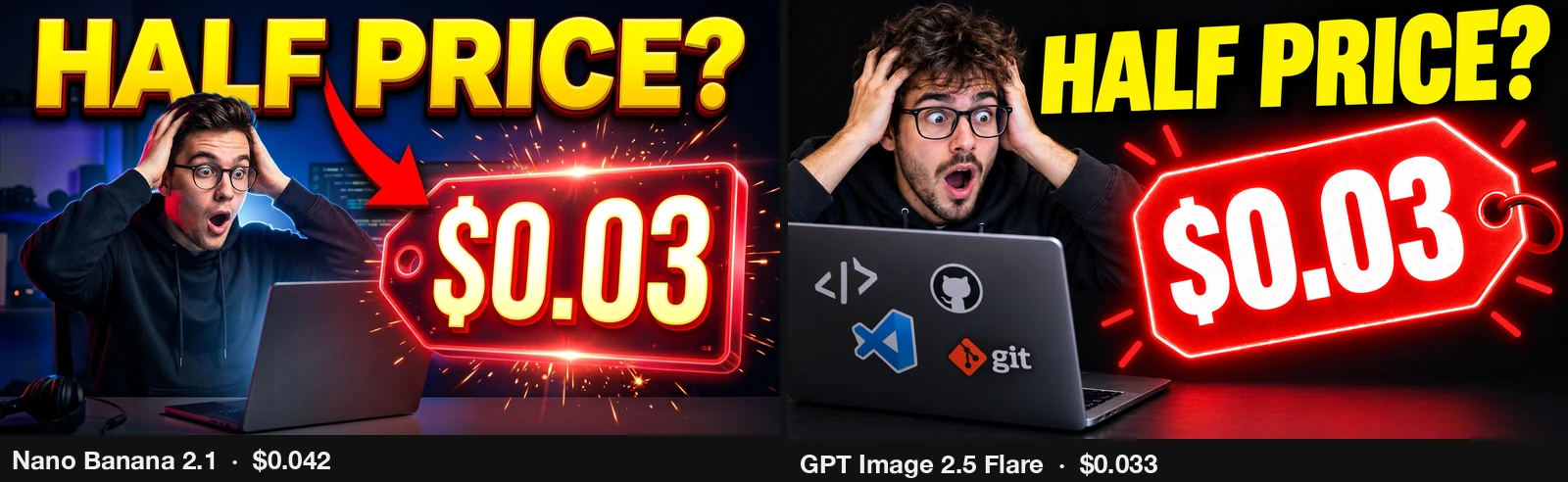
Both spelled “HALF PRICE?” and “$0.03” right. Flare drew real company logos on the laptop, which you do not want in a thumbnail. Nano Banana 2.1 is clean and readable on a phone. Point for Google.
Plastic toy: an empty box
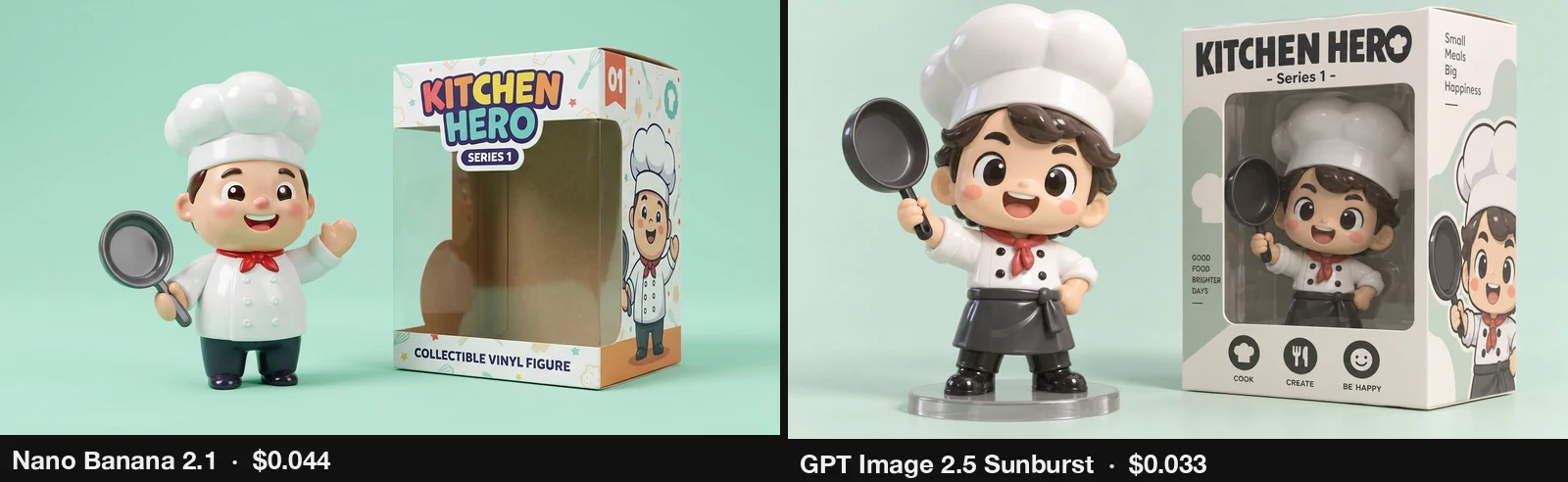
Nano Banana 2.1’s box is empty. Both GPT Image 2.5 pictures put the same shiny chef inside the box, like a real toy on a shelf. Point for OpenAI.
School poster: layout, not spelling
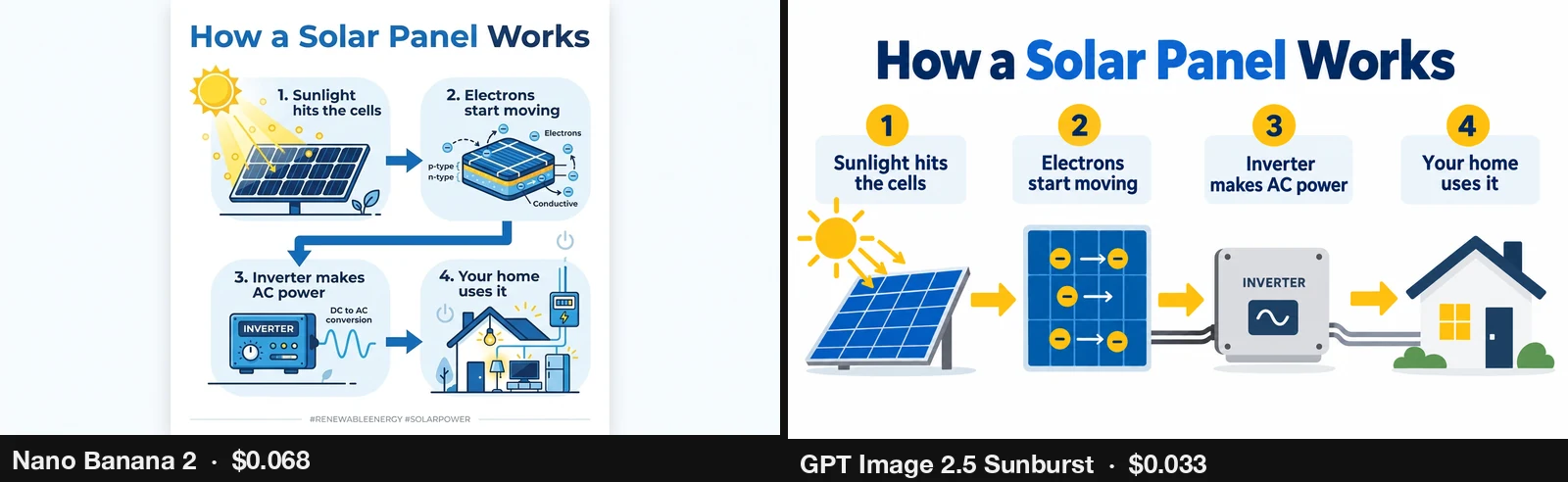
Every model spelled all 4 steps right. Nano Banana 2 made a narrow poster in the middle of a wide frame. Sunburst used the whole frame and wrote exactly the 4 steps. Point for OpenAI.
Fix an old photo: each broke a different rule
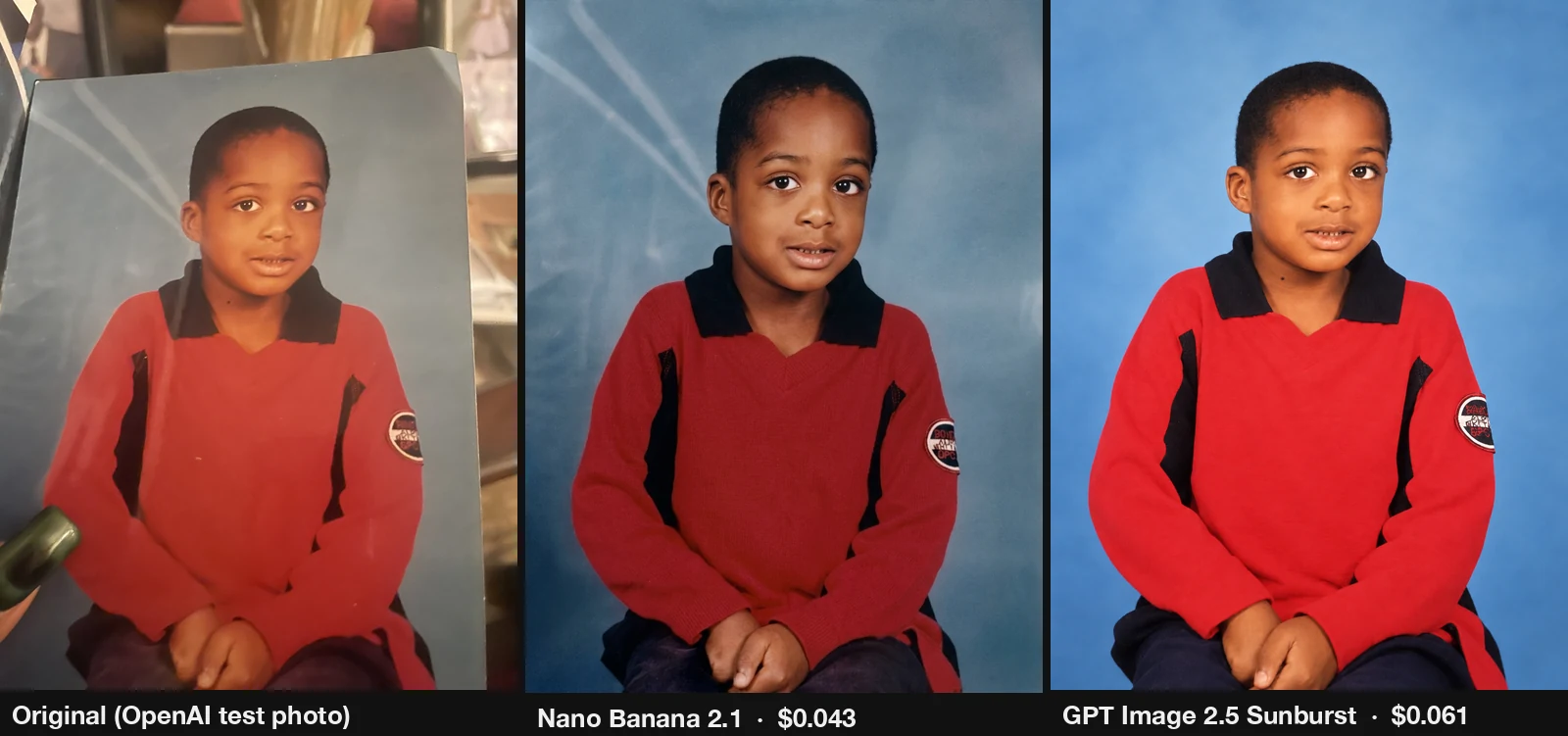
Left is OpenAI’s own test photo, a phone shot of an old printed portrait. Nano Banana 2.1 kept the studio background but made his skin darker. Sunburst kept his skin color but painted a brand new blue background. I asked both to keep everything the same. No point.
New outfit: the tuxedo
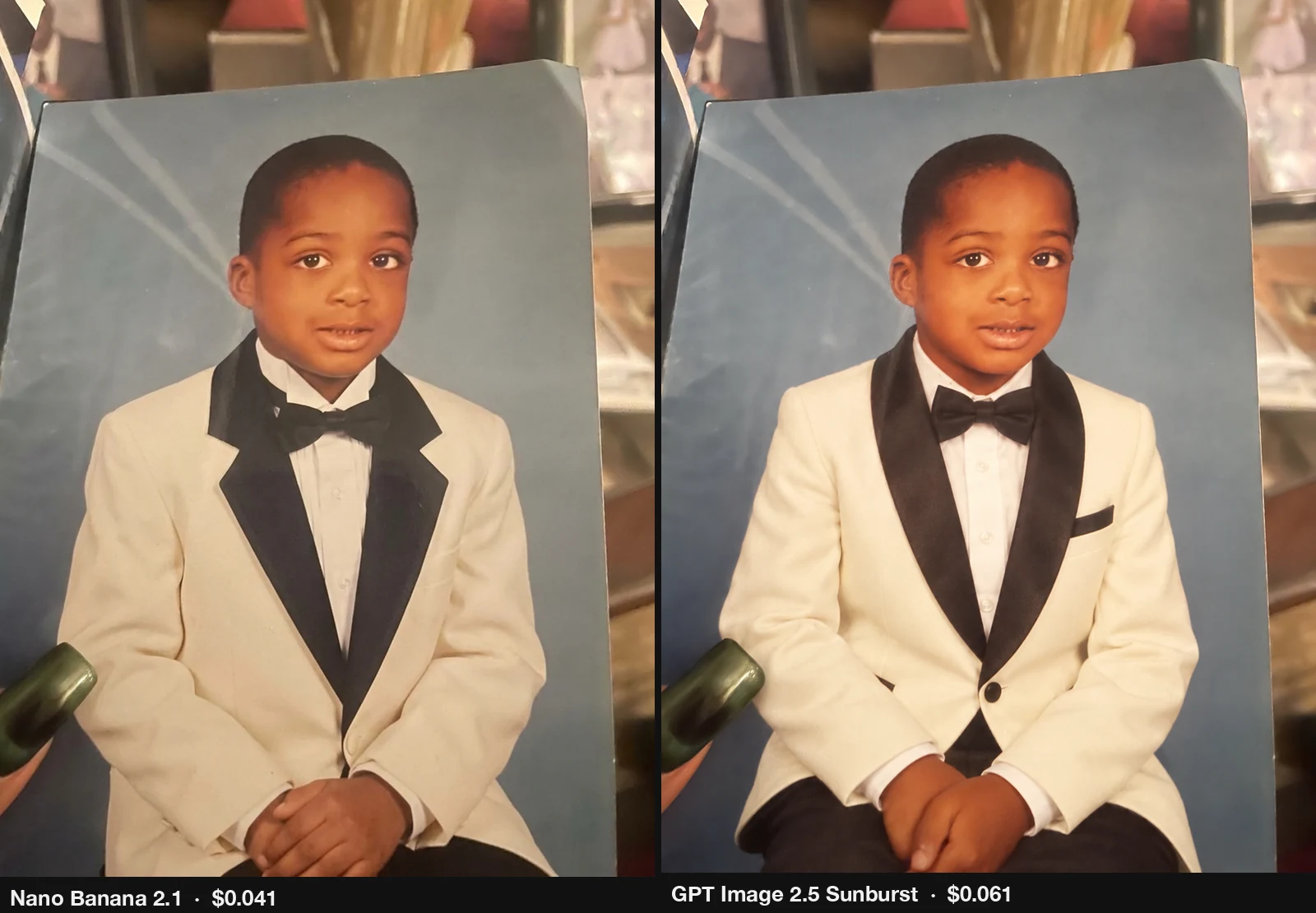
Both kept his face, his hands and the room. Sunburst’s looks more like a real tuxedo, with the round shawl collar and a pocket square, for $0.061. Nano Banana 2.1 did it for $0.041 with a simpler collar. Point for OpenAI.
How do I call Nano Banana 2.1 with the Gemini API?
One generateContent call with responseModalities: ["IMAGE"]. The picture comes back as base64 in inlineData, and the token counts in usageMetadata. This is the request my script sent. Put your own key in the GEMINI_API_KEY environment variable.
curl -s "https://generativelanguage.googleapis.com/v1beta/models/gemini-nano-banana-2.1:generateContent" \
  -H "x-goog-api-key: $GEMINI_API_KEY" \
  -H "content-type: application/json" \
  -d '{
    "contents": [{"parts": [{"text": "Commercial product photo of a matte black wireless earbuds case standing on a wet dark slate stone, a few water droplets on the case, soft morning side light, shallow depth of field, premium tech ad, no text."}]}],
    "generationConfig": {
      "responseModalities": ["IMAGE"],
      "imageConfig": {"aspectRatio": "16:9", "imageSize": "1K"}
    }
}'- Read the picture from
candidates[0].content.parts[].inlineData.data(base64,mimeTypewasimage/jpegin my runs). imageSizetakes1K,2Kor4K. Swap the model id forgemini-3.1-flash-image(Nano Banana 2) orgemini-3-pro-image(Nano Banana Pro).- To edit a photo, put the image first in the same
partsarray:{"inlineData": {"mimeType": "image/jpeg", "data": "<base64>"}}, then the text part. I used"aspectRatio": "3:4"for the edits. - For the cost, multiply
promptTokenCount, the text andthoughtsTokenCounttokens, and theIMAGEtokens incandidatesTokensDetailsby their list prices.
How do I call GPT Image 2.5 Sunburst through OpenRouter?
OpenRouter serves OpenAI’s image models on POST /api/v1/images. Its chat completions endpoint refused them in my test. Put your own key in OPENROUTER_API_KEY.
curl -s https://openrouter.ai/api/v1/images \
  -H "Authorization: Bearer $OPENROUTER_API_KEY" \
  -H "content-type: application/json" \
  -d '{
    "model": "openai/gpt-image-2.5-sunburst",
    "prompt": "Commercial product photo of a matte black wireless earbuds case standing on a wet dark slate stone, a few water droplets on the case, soft morning side light, shallow depth of field, premium tech ad, no text.",
    "aspect_ratio": "16:9",
    "quality": "high",
    "n": 1
  }'
For an edit, add the reference photo (a URL or a data:image/jpeg;base64,... URL; up to 16 images):
{
  "model": "openai/gpt-image-2.5-sunburst",
  "prompt": "Change his outfit to a cream white tuxedo with black satin lapels, a white shirt and a black bow tie. ...",
  "aspect_ratio": "3:4",
  "quality": "high",
  "n": 1,
  "input_references": [
    {"type": "image_url", "image_url": {"url": "data:image/jpeg;base64,<base64>"}}
  ]
}- The picture is in
data[0].b64_json, and what OpenRouter charged is inusage.cost. qualitytakeslow,medium,high,xhighormax. Useopenai/gpt-image-2.5-flarefor Flare: same price, faster in my runs.- Set the shape with
aspect_ratio. My first OpenAI run came back 3:2 (1536x1024, $0.0414 a picture) instead of 16:9. I re-ran all 12 pictures withaspect_ratioand threw the 3:2 ones away. Their $0.50 is still in my total.
Which one should you use?
It depends on the job, not on the scoreboard.
| If you need | Use | Measured cost |
|---|---|---|
| YouTube thumbnails with words | Nano Banana 2.1 | $0.042 at 1K |
| A photo that looks real | Nano Banana Pro | about $0.14 at 1K |
| Lots of cheap pictures | GPT Image 2.5 at low | $0.0039 |
| Product shots, toys, posters, outfit edits | GPT Image 2.5 Flare at high | $0.0326 (edits $0.061) |
If you use GPT Image 2.5, pick Flare. Same price as Sunburst at every quality level, and it was close to twice as fast.
Caveats
- One run per prompt, first picture only. No re-rolls. Run the same prompt again and you can get a different picture, and a different winner.
- Date. Everything was measured on 8 October 2026 (the 2026-10-10 thumbnail calls are not in the test). Prices and models change.
- Google costs are computed, not billed. They are Google’s returned token counts times the list price I read on 8 October 2026, thinking tokens included. OpenAI costs are what OpenRouter charged. I did not call OpenAI’s own API, so I can’t tell you whether it bills the same.
- Not the same settings. Google 1K and OpenAI high are each model’s normal setting, not an equal one. GPT Image 2.5 returned 1536x864, Google 1K returned 1376x768.
- Cost varies a little per prompt. Nano Banana 2.1 thinks a different amount each time: $0.0410 to $0.0473 across my 6 text prompts. Nano Banana Pro ranged $0.1376 to $0.1487. GPT Image 2.5 stayed between $0.0326 and $0.0327.
- Speed varies more. One Flare call in my discarded 3:2 run took 144.5 s. Times are wall-clock, measured by my script around each call.
- The judging is mine. I looked at each picture and wrote down what was wrong. There is no automated score.
FAQ
Is Nano Banana 2.1 cheaper than GPT Image 2.5? Not in my test. Nano Banana 2.1 at 1K cost $0.0418 a picture (computed from tokens). GPT Image 2.5 at high cost $0.0326 (charged by OpenRouter), for a bigger 1536x864 picture.
How much does Nano Banana 2.1 cost per image? $0.042 at 1K, $0.060 at 2K, $0.122 at 4K on the same prompt, measured 8 October 2026. The 6-prompt average at 1K was $0.0438.
How much does GPT Image 2.5 cost per image? $0.0039 at low, $0.0087 at medium, $0.0326 at high, $0.0578 at xhigh, $0.1297 at max, through OpenRouter at 16:9. An edit with one reference photo at 3:4, high, cost $0.0608.
What is the difference between GPT Image 2.5 Sunburst and Flare? Same price at every quality level. Flare averaged 16.9 s, Sunburst 29.9 s. Flare added real logos to my thumbnail and extra sentences to my poster. Sunburst followed the poster prompt exactly.
Is Nano Banana 2.1 really half price compared to Nano Banana 2? The image tokens are: $30 per 1M against $60. But Nano Banana 2.1 also bills its thinking, so a whole picture cost $0.0418 against $0.0684, about 61%.
Which AI image model is best for YouTube thumbnails? Nano Banana 2.1 in my test: the cleanest thumbnail, words spelled right, nothing extra, $0.042.
Which AI image model makes the most realistic photos? Nano Banana Pro for the ad photo, and Google’s three for the portrait. GPT Image 2.5 was brighter and added a hat I never asked for.
Can Nano Banana 2.1 and GPT Image 2.5 write text correctly? Yes. All five models wrote a 5-line chalk menu and a 4-step poster with every letter right.
My take
I expected the “half price” model to be the cheapest picture on my bill, and it was not. GPT Image 2.5 at high cost less than Nano Banana 2.1 and gave me more pixels. Its low setting, at under half a cent, is the real surprise for anyone making lots of pictures. But the cheapest picture is not the best one for every job. For my own thumbnails I will keep using Nano Banana 2.1, because it did what I asked and nothing more. For edits and product shots, I would start with GPT Image 2.5 Flare. Both teams built great tools, and the gap between them is now a cent or two a picture. Pick by the job, then test your own prompt, because one run is one run.
Sources
- My video, “Nano Banana 2.1 vs GPT Image 2.5: I Tested 8 Prompts and Paid for Every Image” (10 October 2026): https://youtu.be/HyI699BRPNg
- Google, Gemini API pricing (read 8 October 2026): https://ai.google.dev/gemini-api/docs/pricing
- Google, Gemini API image generation docs: https://ai.google.dev/gemini-api/docs/image-generation
- OpenRouter API docs: https://openrouter.ai/docs
- OpenAI, “Introducing ChatGPT Images 2.5” (source of the test photo in challenges 7 and 8): https://openai.com/index/introducing-chatgpt-images-2-5
- Measured data: my own bench run on 8 October 2026, 66 calls. Google costs: token counts Google returned x list price (Nano Banana 2 and Pro rates from Google AI Studio; Nano Banana 2.1 rates as listed for its Google AI Studio endpoint on OpenRouter), $2.83 over 30 calls. OpenAI costs:
usage.costcharged by OpenRouter, $1.53 over 36 calls. Total $4.36.
Independent test by Anass Kartit. Not affiliated with Google or OpenAI.
Newsletter
Get the next post and game in your inbox
One email when I publish something new: measured write-ups on AI, local models and cloud, plus games like NEON RUN.