Azure SRE Agent: Real Cost, Safe Setup and Least Privilege (Measured)
Azure SRE Agent, measured: 10.56 USD a day per agent always-on, 0.11 to 1.10 USD per investigation. Portal vs Terraform, least privilege, roles to audit.
 Series Azure AI & Cloud All episodes →
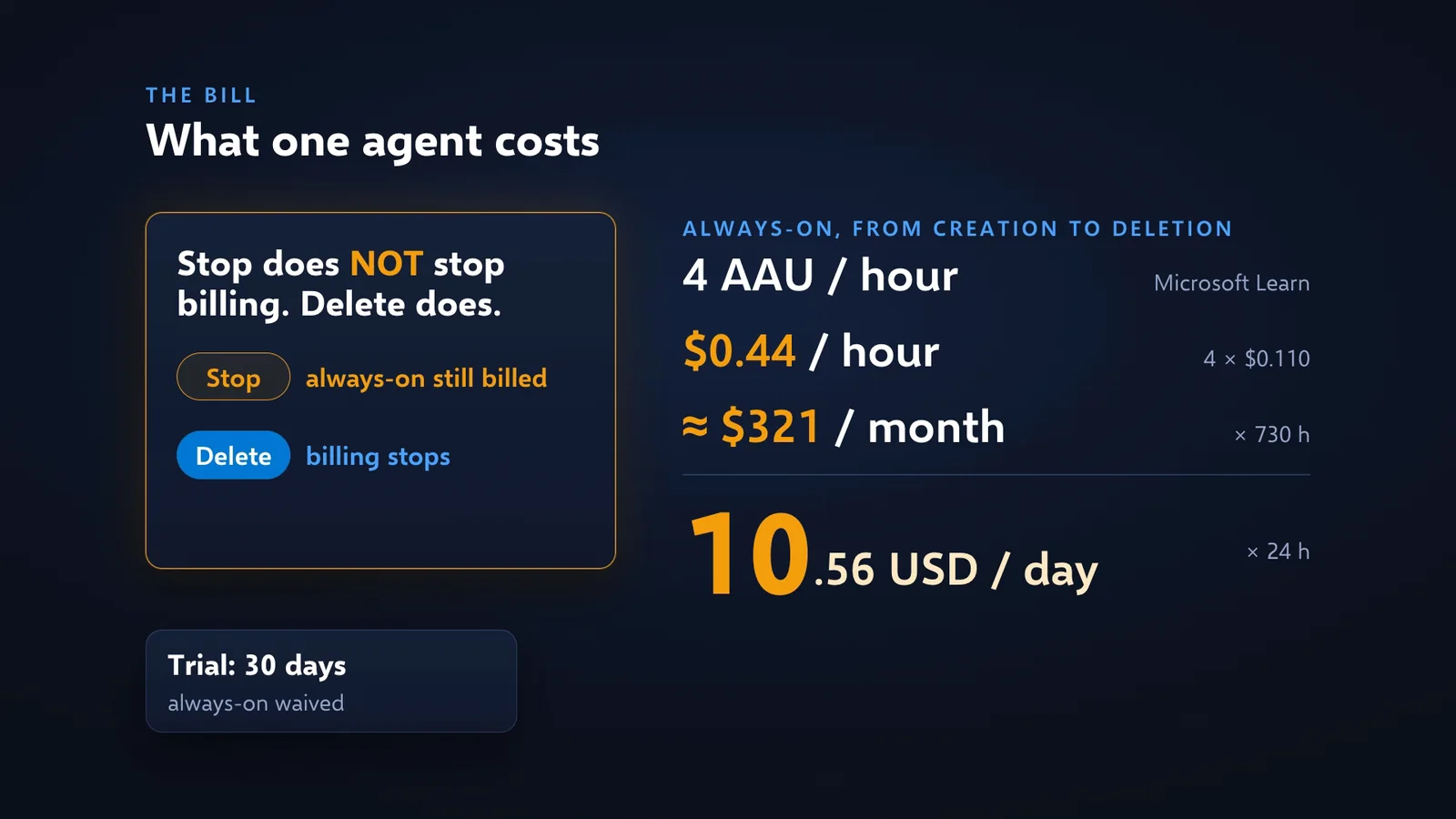
Azure SRE Agent found the exact network rule that broke my web app, with read-only rights, and that investigation cost 10 AAU, about 1.10 USD. I measured it live on 3 November 2026 in a disposable Azure lab in Sweden Central. The fixed part is what matters for the budget: every agent bills 4 AAU per hour from creation to deletion, 10.56 USD a day or about 321 USD a month at the Sweden Central list price of 0.110 USD per AAU. This post is the written companion to my video: what the agent is, how to deploy it from the portal and with Terraform, what it found, how it behaves on incidents, the least-privilege roles I would give it, the one role to audit after any portal setup, the measured bill and a checklist before production.
Video: Azure SRE Agent: Real Cost, Safe Setup and Least Privilege (Measured), 15 min 51 s, on my YouTube channel @anasskartit. Lab code and a production checklist: github.com/AnassKartit/azuresre.
Key facts (quick answer)
| Fact | Azure SRE Agent (measured 3 November 2026 unless marked) |
|---|---|
| What it is | A paid Azure resource: an AI agent with its own managed identity and RBAC roles |
| Billing unit | Azure Agent Unit (AAU), meter “SRE Agent Unit” |
| List price per AAU | Sweden Central and France Central 0.110 USD, East US 0.100 USD, West Europe 0.136 USD (Azure Retail Prices API) |
| Always-on | 4 AAU per hour per agent (Microsoft Learn) = 0.44 USD/h, 10.56 USD/day, 321.20 USD per 730-hour month in Sweden Central |
| Stop vs delete | Stopping does not stop always-on billing. Deleting does (Microsoft Learn) |
| Trial | Always-on waived for 30 days, up to 3 agents (Microsoft Learn) |
| Measured work, all threads | 27 AAU = 2.97 USD |
| Per thread | NSG chat diagnosis 10 AAU (1.10 USD), alert investigation 8 AAU (0.88 USD), onboarding chat 7 AAU (0.77 USD), scheduled health check 1 AAU (0.11 USD) |
| Default monthly limit | Always-on plus 10,000 active AAU, a ceiling of about 1,100 USD of work |
| Deploy time | Portal about 2 min, Terraform apply 1 min 42 s |
| API | Microsoft.App/agents@2026-07-01 (azapi provider) |
| Subnet, if needed | Dedicated /27 or larger, delegated to Microsoft.App/environments, outbound only |
TL;DR
- It works in chat. Asked why the web app could not pull its image, it named the NSG rule
deny-app-to-registry-https, priority 100, with read-only rights, for 10 AAU (1.10 USD). - The fixed fee is the bill. 10.56 USD a day per agent in Sweden Central, about 321 USD a month, until you delete it. Plan one agent per team.
- Code beats the portal for repeatability. Terraform pinned
gpt-6.1-sol, usedAzureVNetegress and held only the roles in code. The portal gaveAutomatic,Limitedand one extra role. - Audit the roles. After I connected incidents, the agent identity held Monitoring Contributor on the whole subscription, a role the portal never displayed.
- RBAC is the real guardrail. In Autonomous mode the agent tried to restart the web app and its read-only roles blocked it.
- Automatic runs are useful, not magic. The alert-driven run lined up the timeline but did not find the NSG rule that the chat run found.
What is Azure SRE Agent, and how is it different from Azure Copilot?
Azure has two AI helpers for operations: Azure Copilot answers when you ask, with your rights; Azure SRE Agent is a separate resource with its own identity that can start working by itself.
| Azure Copilot | Azure SRE Agent | |
|---|---|---|
| Who starts it | You, in the portal | You, or an Azure Monitor alert, PagerDuty, ServiceNow, a schedule or a web hook |
| Whose permissions | Yours | Its own managed identity and the RBAC roles you give it |
| How far it can go | Your rights | Read only, Review (a human approves every change) or Autonomous |
| Cost | Included | Always-on fee plus metered work |
It also keeps a memory: on its first start my agent explored its scope (the web app, two VMs, the monitoring) and wrote it down. For private resources it can join your virtual network through a small delegated subnet, outbound only. The agent and the AI model still run at Microsoft. Its data stays in the region you deploy it to, and it can investigate resources in any region.
What does the architecture look like?
One agent covers many resource groups in different regions; its own region only decides where its data lives.
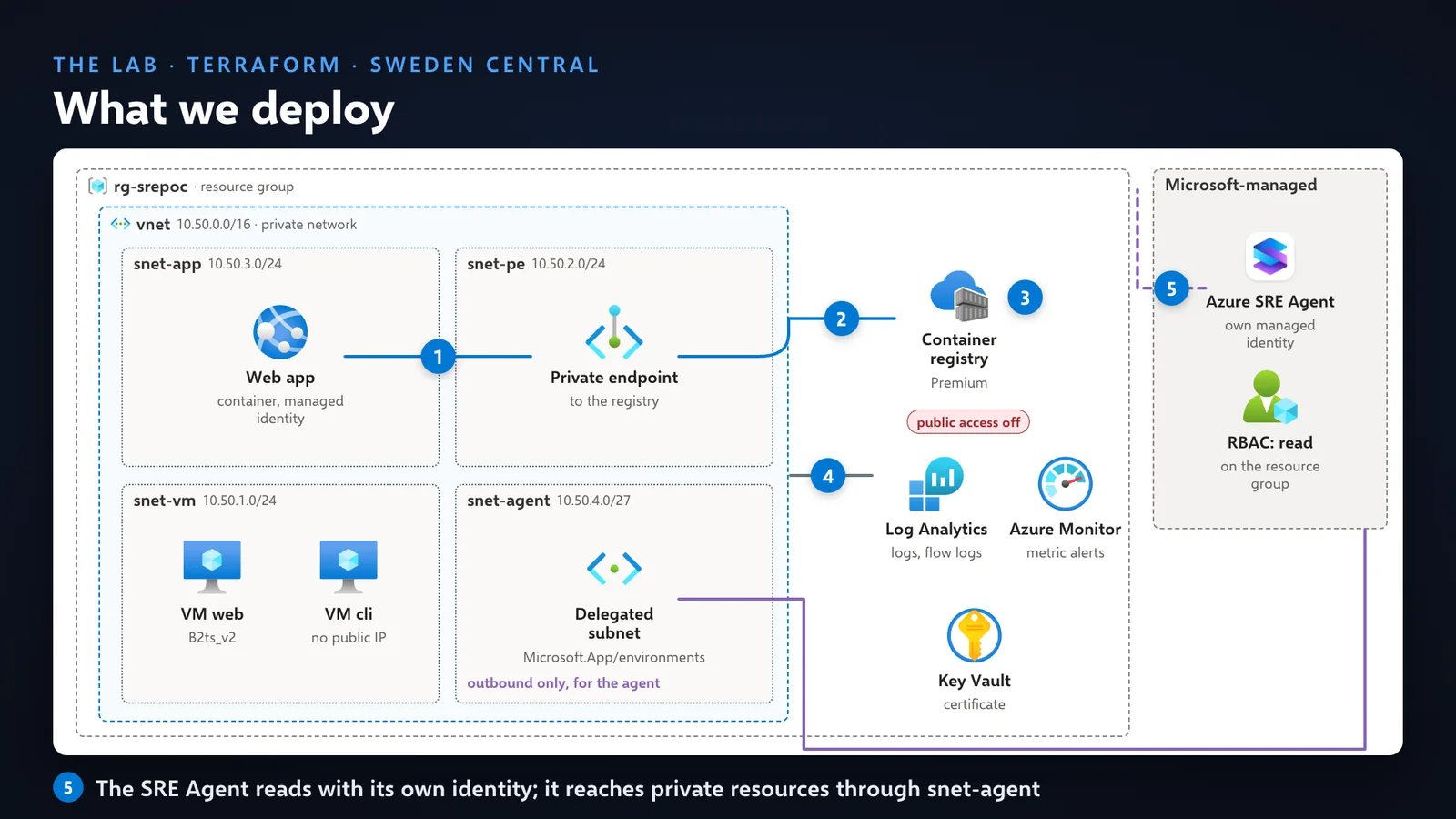
The lab, all in Terraform: a VNet, two small Ubuntu VMs, a Premium container registry with public network access disabled, a private endpoint and private DNS zone, an App Service web app that pulls its image through that endpoint, Log Analytics and Azure Monitor alerts, a Key Vault, and the agent. Terraform plans 48 resources and the lab is up about six minutes later. In the portal the resource group shows 35 resources, and the resource visualizer draws the same picture.
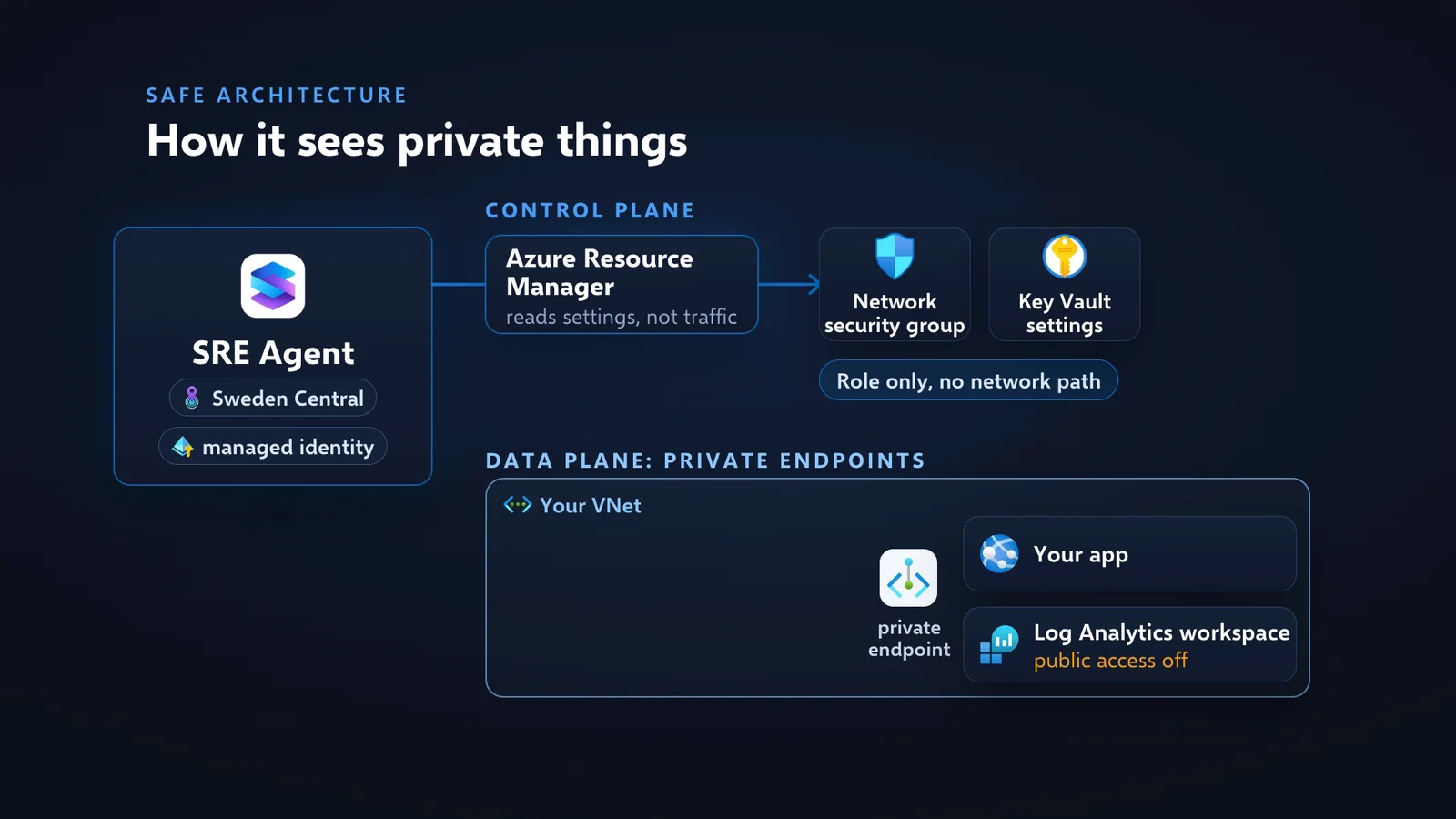
| Path | What goes through it | What it needs |
|---|---|---|
| Control plane (Azure Resource Manager) | Reading NSG rules, firewall policies, Key Vault settings, metrics, activity log | A role. No network path |
| Data plane (private endpoints) | Your app, a Log Analytics workspace with public access off, databases behind private endpoints | VNet integration: a dedicated /27 or larger subnet delegated to Microsoft.App/environments, same region as the agent, outbound only |
Microsoft Learn is clear on the limits, and they are worth repeating to a security team: VNet integration does not make the agent private (there is no private endpoint to the agent), connectors such as PagerDuty or GitHub still use the public internet, and orchestration and model calls always run on Microsoft’s infrastructure.
Portal or Terraform: which way should you deploy it?
Both work in about two minutes; code gives you the exact model, network and roles, which is what you need for repeatable tests and predictable cost.
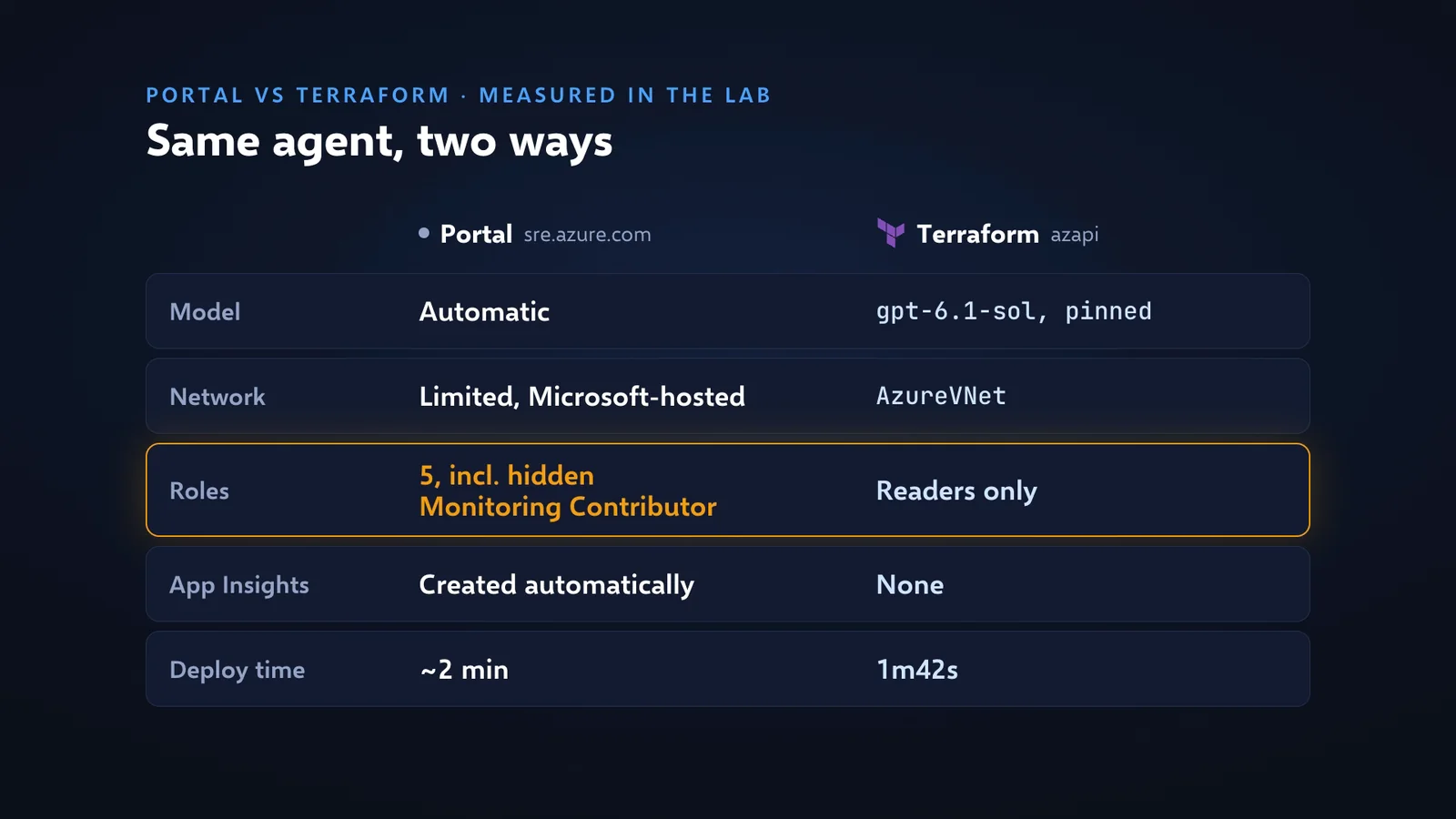
| Portal (sre.azure.com) | Terraform (azapi, Microsoft.App/agents@2026-07-01) | |
|---|---|---|
| Model | You pick a provider, not a model. Read back via the API: Automatic | Exactly what you pin. Read back: defaultModel = gpt-6.1-sol |
| Provider choice | Azure OpenAI (1x, inside the EU Data Boundary) or Anthropic (3x, Microsoft warns data may be processed in the United States) | Azure OpenAI model pinned in code |
| Network mode | Limited (Microsoft-hosted, URL allow-list) | AzureVNet through our delegated subnet, all egress allow-lists empty |
| Roles on the identity | Screen lists 4 readers, 5 granted: plus Monitoring Contributor | Only the roles in code |
| Application Insights | Created automatically | None (add one yourself if you want traces) |
| Time to deploy | About 2 min | 1 min 42 s for the apply |
In the portal the steps are short: Create agent, pick a resource group, a name and a region, choose the provider, then tell it what it may look at. I scoped it to one resource group, not the whole subscription, and kept it read-only. For a European company the provider choice matters: Azure OpenAI stays inside the EU Data Boundary.
In Terraform the model is one line in a file, and one apply creates the agent in under two minutes. The repo has the full code: github.com/AnassKartit/azuresre.
What did Azure SRE Agent find in chat?
It found the exact NSG rule behind a private-endpoint failure, without borrowing my rights.
I broke the lab on purpose and asked, in plain English: why can’t the web app pull its container image?
| Item | Result |
|---|---|
| Fault | An NSG rule denying the web app subnet to the registry’s private endpoint |
| Found | Rule deny-app-to-registry-https, priority 100, TCP 443, from the web app subnet to the registry’s private-endpoint subnet |
| Ruled out | AcrPull role present, DNS fine, VNet image pull enabled |
| Extras | Drew the path with the deny in red, listed what it did not verify, “No changes or credential grants were made” |
| Duration | About 6 min, of which about 2 min paused on an approval card (paused time is not billed, per Microsoft Learn) |
| Cost | 10 AAU, about 1.10 USD |
One moment deserves attention. With its own read-only identity, one command was refused: reading the app settings needs Microsoft.Web/sites/config/list/action, which Azure itself names “List Web App Security Sensitive Settings”. The agent then offered Grant permissions: re-run that command with my credentials, through on-behalf-of (OBO) authorization. I am an Owner on that subscription. That is a powerful option: a read-only agent can borrow your rights for one command. I said no, continue with your own access only, and it still found the rule.
How does it handle incidents on its own?
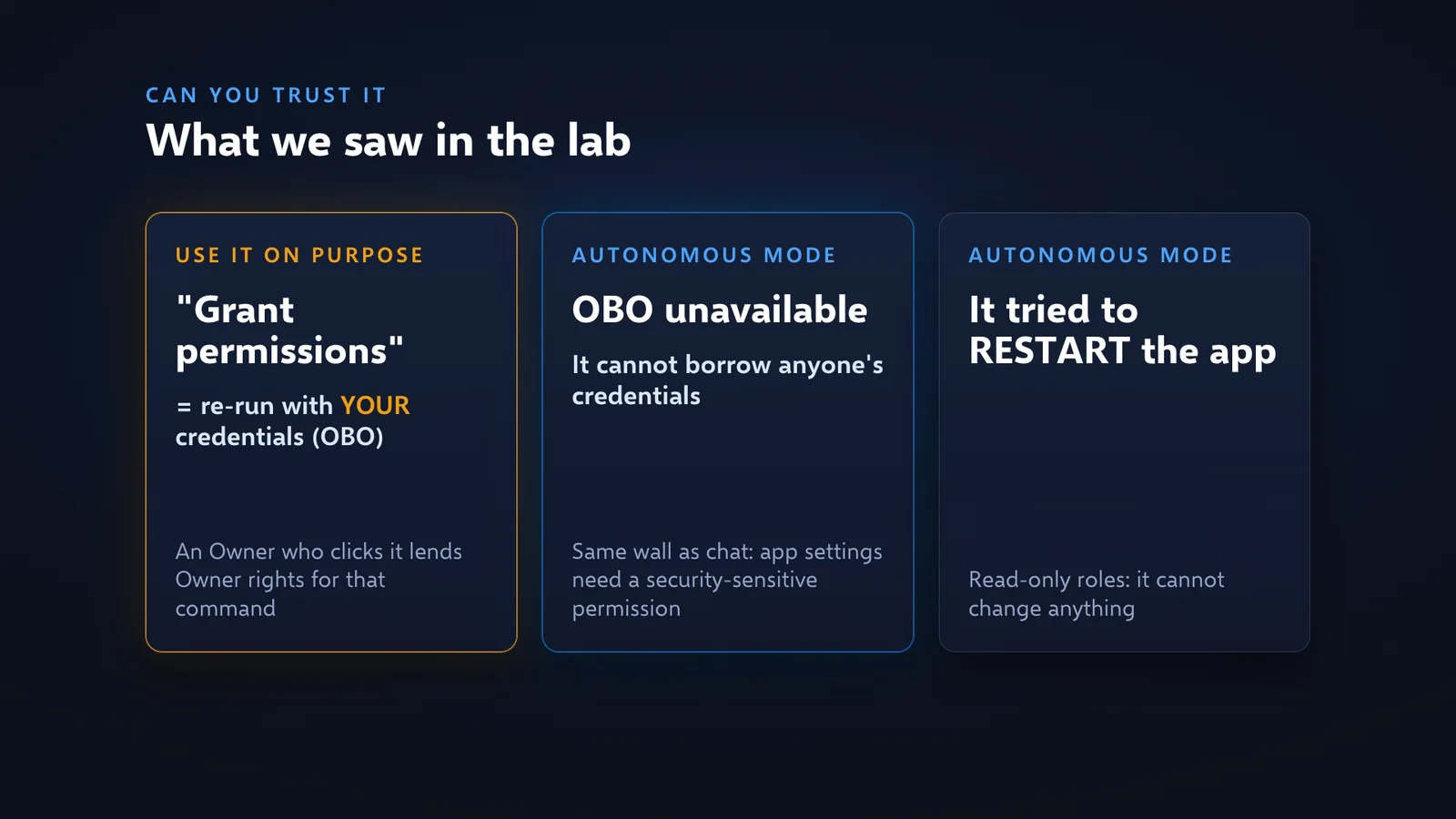
It opens its own investigation when an alert fires, and in Autonomous mode its RBAC roles, not a prompt, decide what it can change.
Setup steps I used:
- Connect an incident source. Azure Monitor alerts need no key (about 45 seconds). PagerDuty and ServiceNow are also supported.
- Create a response plan: which alerts (severity, title contains “5xx”) and what the agent should do. The preview already showed my web app 5xx alert.
- Change the autonomy level. The default on the response plan was Autonomous. I switched it to Review: the agent investigates and a human approves any change.
- Keep the cost control: if the same alert fires again within three hours, the agent does not investigate it twice.
Then the alert fired and the agent opened its own investigation. That alert had fired before my switch to Review, so the thread ran in Autonomous mode:
| Item | Result |
|---|---|
| Credentials | OBO unavailable: “this thread runs in Autonomous mode”. It could not borrow anyone’s rights |
| Timeline | Correlated the 503s with a restart at 09:53 UTC that morning. True: we did that |
| Fix attempt | Tried to restart the web app. Denied: the identity lacks Microsoft.Web/sites/restart/action. “No changes were made” |
| Advice | Suggested granting Website Contributor. Far wider than restart; use a one-action custom role instead |
| Root cause | Not found. The chat run named the NSG rule; this automatic run left it “unconfirmed” |
| Cost | 8 AAU, about 0.88 USD |
Review mode, the OBO block in Autonomous mode and RBAC are three real guardrails. The honest result is that the automatic run is a strong first draft for the on-call engineer, not a replacement for one.
Which permissions should the agent get? Least privilege
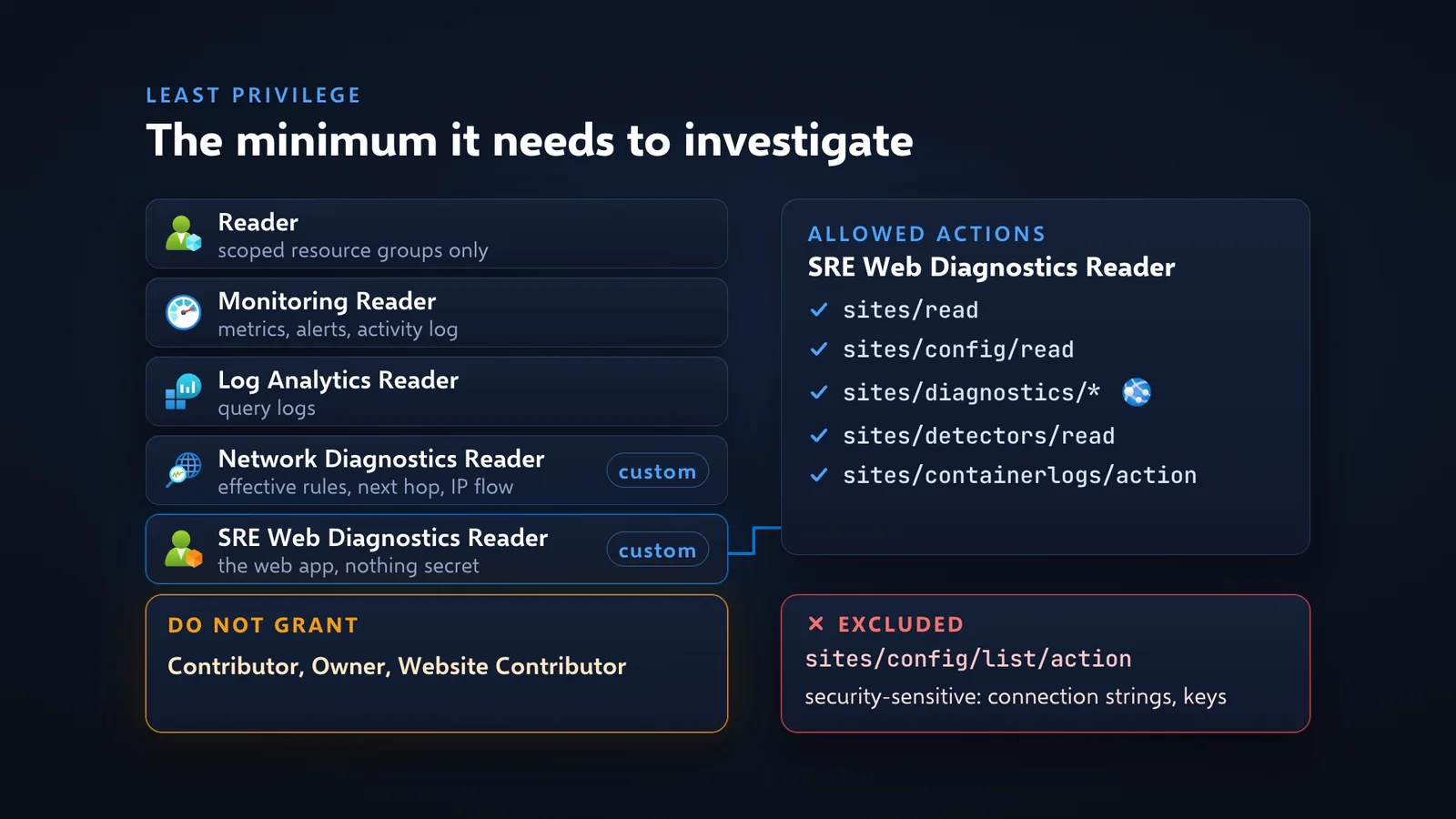
Readers to investigate, plus two small custom roles for diagnostics; nothing that writes and nothing that reads secrets.
| Role | Scope | Gives |
|---|---|---|
| Reader | The resource groups it watches | Read resources, NSG rules, firewall policies, route tables |
| Monitoring Reader | Same | Metrics, alerts, activity log |
| Log Analytics Reader | Same, plus the workspace that holds firewall logs if you have one | Query logs |
| Custom “Network Diagnostics Reader” | Lab resource groups and NetworkWatcherRG | Effective NSG rules, effective routes, next hop, IP flow verify, security group view, flow log status |
| Custom “SRE Web Diagnostics Reader” | The app’s resource group | sites/read, sites/config/read, sites/diagnostics/*, sites/detectors/read, sites/containerlogs/action. NotActions: sites/config/list/action |
| Optional custom “SRE Responder” | Single resources only, off by default | Restart, start, stop one web app; edit rules of one NSG |
Never grant:
| Do not grant | Why |
|---|---|
Microsoft.Web/sites/config/list/action | App settings hold connection strings and keys. The agent does not need your secrets to find a broken rule |
| Contributor or Owner | Defeats the Low access level |
| Website Contributor (the agent’s own suggestion) | Far wider than restart |
| Monitoring Contributor | Writes alert rules and diagnostic settings |
| Key Vault data roles | Secrets and certificates. In my test the agent also refused to run az keyvault commands |
| Storage Blob Data Reader | Reads blob contents; the portal adds it by default, diagnosis does not need it |
One practical detail: new role assignments took about five minutes to work. A retry two minutes after a grant still failed.
Which role did the portal add, and how do you audit it?
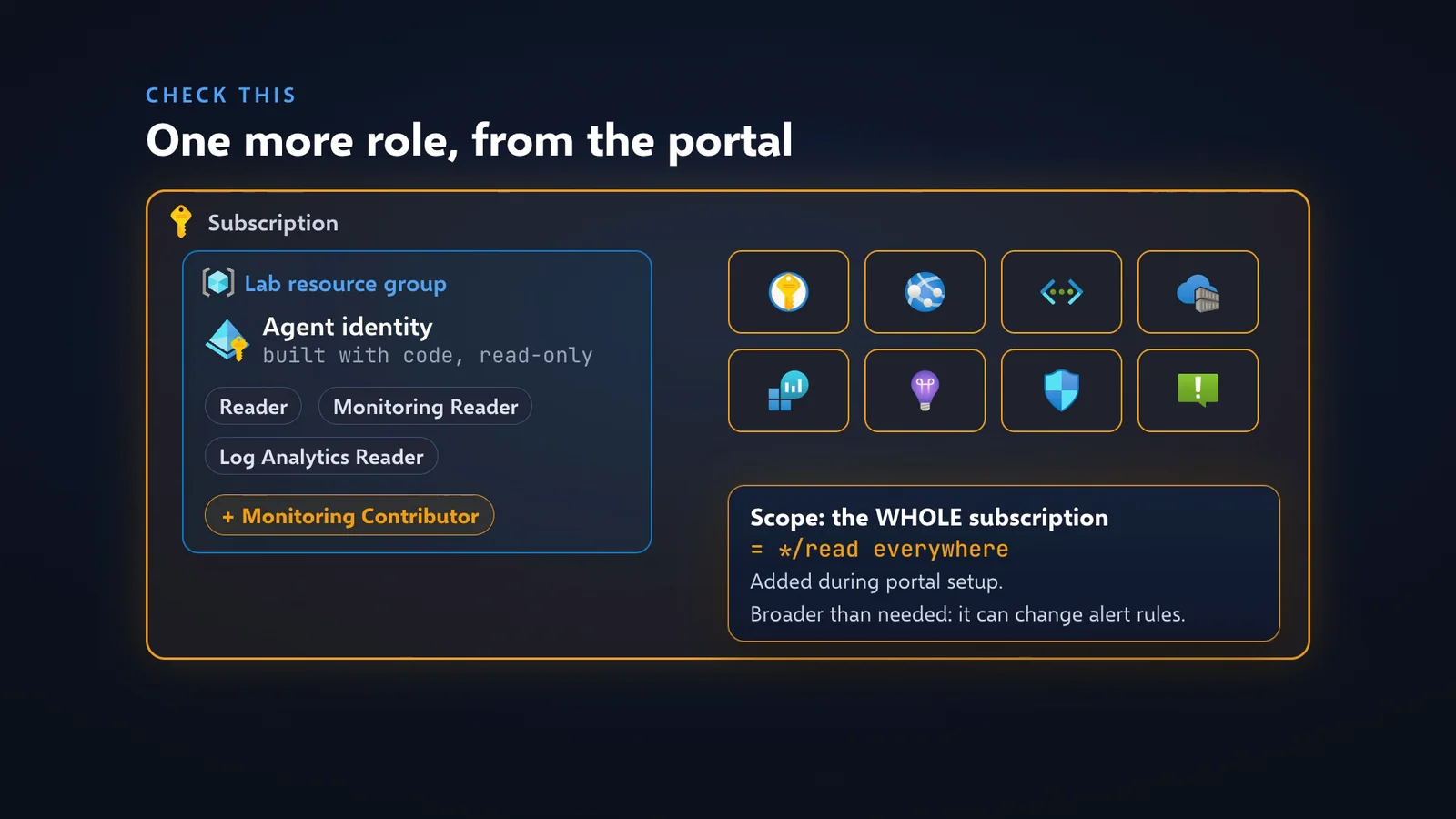
Monitoring Contributor, on the whole subscription, never displayed: list the agent identity’s role assignments at every scope after any portal setup.
| Item | What I saw |
|---|---|
| Identity | The Terraform agent’s identity, deployed with reader roles only |
| What appeared | Monitoring Contributor at the whole subscription scope, created 2026-11-03 at 10:36:14 UTC |
| By whom | My own account, through the SRE Agent portal, right after connecting Azure Monitor as the incident platform. Likely reason, not confirmed: the incident integration updates alert state |
| Shown in the portal | No |
| Effect | Its first permission is */read: the agent, scoped to two resource groups, could read every resource in the subscription, and it could change alert rules and diagnostic settings |
I proved the effect with a second test. I created a resource group in France Central with an NSG rule blocking HTTPS and gave the agent no access to it. It found the rule anyway, and even noticed the rule was not attached to anything. After I removed the subscription-wide role: authorization error, and once more an offer to use my credentials. I said no and granted Reader on that one resource group in code. A few minutes later it read the rule with its own identity: deny-https-in, priority 100, inbound, TCP 443. Region does not matter. Scope does, and only RBAC defines the scope.
The audit, after any portal setup and after connecting incidents:
az role assignment list --all --assignee <agent-principal-id> -o tableThen remove what is not in your code, or narrow Monitoring Contributor to the agent’s own resource groups. A custom role limited to alert state changes (Microsoft.AlertsManagement/alerts/changestate/action plus read) is a candidate replacement; I have not yet measured whether the incident integration works with it. For teams, an Azure Policy or a scheduled audit that alerts on any role assigned to the agent identity outside code closes the gap.
How do scheduled checks work, and what do they cost?
A scheduled task runs a plain-English check on a timer; on the Fast tier my daily health check cost 1 AAU, about 0.11 USD.
| Setting | What I chose |
|---|---|
| Where | Automation, Create, Scheduled task |
| Instructions | Check the lab every morning, read only, five bullet points, one status: OK, warning or down |
| Model tier | Fast, labelled “lowest cost” (Haiku 4.5 / GPT-5-mini in the form) |
| Run limit | Set, so a forgotten task cannot run forever |
| Autonomy | Default was Autonomous: switched to Review |
Run now gave a report about three minutes later: web app down with 503s, VM healthy, still failing after the morning restart, overall status Down. The trade-off was visible. The Fast model got an az monitor metrics list command wrong three times, read the CLI help and fixed itself. And it missed that our alert had already fired. A daily check does not need the biggest model, but expect a cheaper model to be clumsier.
What does Azure SRE Agent really cost?
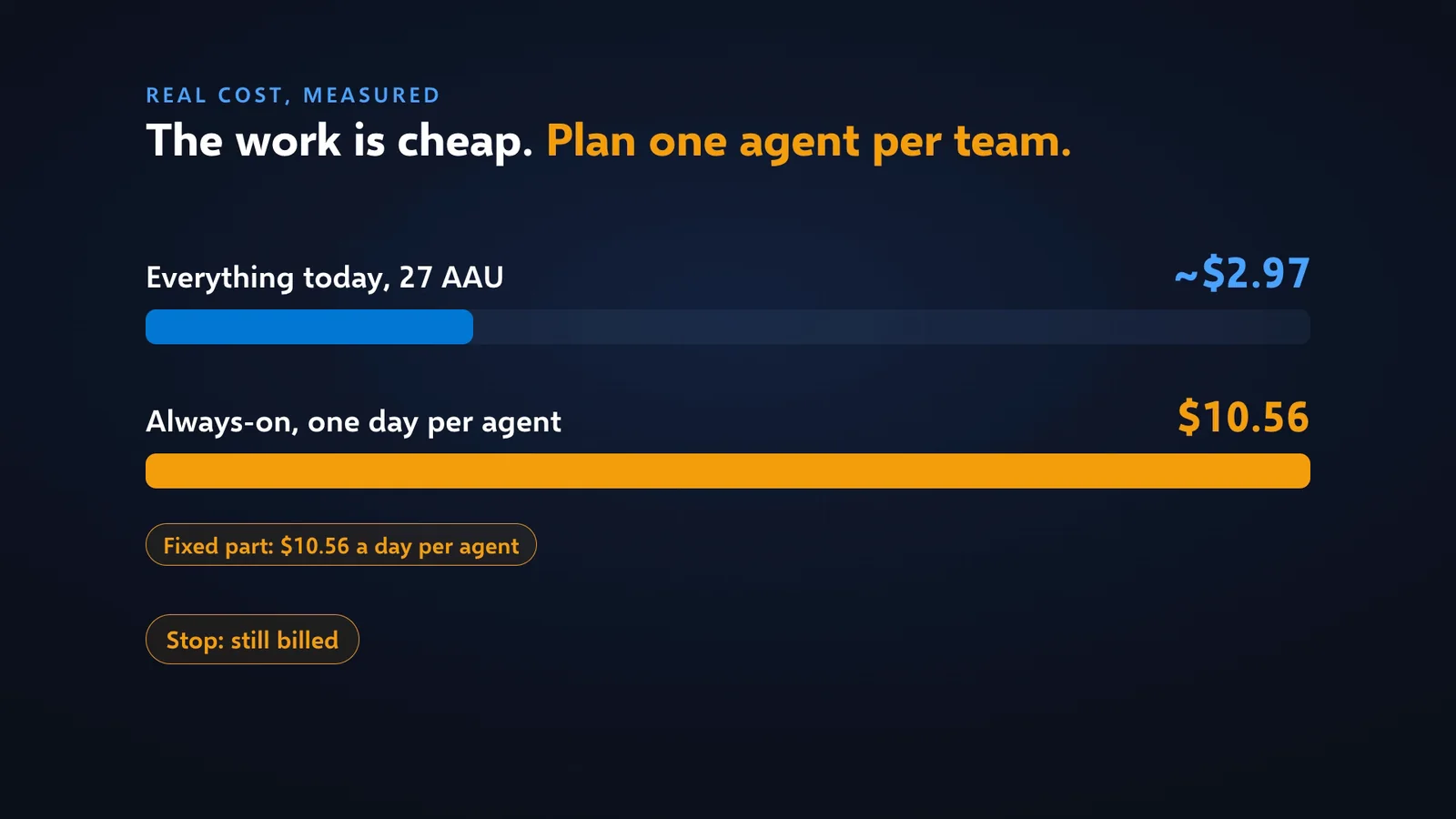
The work is cheap, about a dollar per investigation; the fixed always-on fee is most of the bill.
Price per region (Microsoft retail list prices, Azure Retail Prices API, queried 3 November 2026; your contract may differ):
| Region | Per AAU | Always-on per hour | Per day | Per month (730 h) |
|---|---|---|---|---|
| East US | 0.100 USD | 0.40 USD | 9.60 USD | 292.00 USD |
| Sweden Central, France Central | 0.110 USD | 0.44 USD | 10.56 USD | 321.20 USD |
| West Europe | 0.136 USD | 0.544 USD | 13.06 USD | 397.12 USD |
Measured work on top of always-on (Build and setup, Monitor, Agent consumption, Sweden Central):
| Thread | Type | AAU | USD |
|---|---|---|---|
| NSG diagnosis, the run that found the rule | Chat | 10 | 1.10 |
| Automatic alert investigation | Incident | 8 | 0.88 |
| Onboarding chat the agent ran by itself at creation | Chat | 7 | 0.77 |
| Morning health check, Fast tier | Scheduled task | 1 | 0.11 |
| Total shown by the portal (per-thread values are rounded) | 27 | 2.97 |
An estimate for one team, not a measurement: one agent always-on, 20 investigations at the 8 to 10 AAU I measured, and a daily Fast-tier check comes to about 3,110 to 3,150 AAU, about 342 to 347 USD a month in Sweden Central. Always-on is over 90 % of that.
Plain advice, no FinOps jargon:
- Count agents, not questions. One agent per team, with a tight scope. Not one per app, not one per region.
- Delete, do not stop. A stopped agent still bills 10.56 USD a day. So does an agent that hit its spending cap.
- Lower the monthly limit. The default is always-on plus 10,000 active AAU, about 1,100 USD of work. The minimum cap is 500 AAU (55 USD, computed). Increases apply at once, decreases next month (Microsoft Learn).
- Use the trial on purpose. Always-on is waived for the first 30 days, for up to 3 agents.
- Keep the 3-hour cooldown on response plans, and filter them on severity and title.
- Pick the model tier per task. Fast for routine checks, a stronger model for real incidents.
- Pick the region with your data-residency team. Between East US and West Europe the price per AAU differs by 36 %.
The lab itself (registry, App Service, two VMs, disks, private endpoint, logs) cost about 3.5 to 3.7 USD a day in Sweden Central. Destroy it when you are done, and delete any agent you created in the portal.
Checklist before production
Identity and access
- Deploy the agent with code, and list only the resource groups it should watch.
- Reader, Monitoring Reader, Log Analytics Reader, plus the two custom diagnostics roles, at those scopes only.
- Add
Microsoft.Network/networkWatchers/connectivityCheck/actionto the network role if you need end-to-end path tests. - Remediation only on request: one narrow custom role on named resources, with a Review response plan. Never Contributor.
- After any portal setup or incident connection:
az role assignment list --all --assignee <id>, then remove what is not in code. - Teach people to cancel Grant permissions unless they mean to lend their rights for that command.
- Give people SRE Agent user roles on purpose: Administrator for the owners who approve actions, lower roles for responders.
Network
-
AzureVNetonly if the agent must reach private endpoints: a dedicated /27 or larger, delegated toMicrosoft.App/environments, same region, own NSG, routes through your firewall.
Model and data
- Azure OpenAI provider if you need the EU Data Boundary; pin the model per region from the supported-models API.
- Agent region = your data-residency region.
Operations and cost
- Response plans and scheduled tasks in Review, not the default Autonomous. Set it before saving: the first thread starts when the plan is created.
- 3-hour cooldown kept, filters on severity and title, run limits on scheduled tasks.
- Monthly AAU cap set from your expected volume, and a cost alert on the agent resource.
- Idle agents deleted, not stopped.
Things to know (from Microsoft Learn and the lab)
These are the details I would tell a colleague before a first rollout. None of them is a blocker.
- Region list. The Learn FAQ page I read (dated 2 June 2026) listed 3 regions; the portal offered 27 when I created the agent. Trust the portal for what you can deploy today.
- Model names move fast. The scheduled-task tiers, the supported-models API and the Learn rate table use different model names. Trust the API list for what you can pin.
- Risk labels are hints, not controls. Some read-only commands, such as
az acr show, were labelled “Medium risk”. Use RBAC as the control. - Network audit is partial. Settings, Workspace configuration, Network audit covers egress-policy decisions only (Microsoft Learn).
- Creating an agent needs high rights: Owner or User Access Administrator on the subscription, with
Microsoft.Appregistered (Microsoft Learn).
My take
If someone is always there to ask the questions, Azure Copilot is enough, and it is included. If you want alerts investigated at night, daily health checks and an agent that learns your environment, Azure SRE Agent is worth trying. What impressed me most is not the chat answer, good as it was: it is that the safety model holds when you set it up properly. Read-only roles stopped an autonomous restart, Autonomous mode refused to borrow credentials, and the agent refused Key Vault commands on its own. Each investigation cost about a dollar, on top of a predictable fixed fee of 10.56 USD a day per agent. Keep it read only, set Review mode, audit the roles the portal adds, lower the spending cap, and delete the agents you do not use.
This is part of my Azure AI & Cloud series: one Azure service per episode, deployed, broken on purpose and billed for real. All my Azure work is on the Azure hub.
FAQ
What is Azure SRE Agent? A separate, paid Azure resource: an AI agent with its own managed identity that investigates problems in the resource groups you give it, in chat or started by an alert, a schedule or a web hook.
How much does Azure SRE Agent cost? 4 AAU per hour per agent always-on. At 0.110 USD per AAU in Sweden Central that is 10.56 USD a day, about 321 USD a month, plus work: 0.11 to 1.10 USD per thread in my lab.
Does stopping the agent stop the bill? No. Only deleting it stops the always-on charge.
Azure Copilot or Azure SRE Agent? Copilot when a person is at the keyboard; SRE Agent when you want an investigation started by an alert or a schedule, with its own identity.
Portal or Terraform? Terraform for repeatable results: pinned model, your network mode, only the roles you wrote. Audit the roles after any portal step.
Which permissions does it need? Reader, Monitoring Reader, Log Analytics Reader and two small custom diagnostics roles on the resource groups it watches. Nothing that writes, nothing that reads secrets.
Does it need a subnet? Only to reach private endpoints: a dedicated, delegated /27 or larger, outbound only.
Can it fix problems by itself? Only within its roles. With read-only roles its autonomous restart was blocked.
Sources
Microsoft Learn (read on 3 November 2026):
- Overview: https://learn.microsoft.com/en-us/azure/sre-agent/overview
- Pricing and billing: https://learn.microsoft.com/en-us/azure/sre-agent/pricing-billing
- FAQ: https://learn.microsoft.com/en-us/azure/sre-agent/faq
- Network integration: https://learn.microsoft.com/en-us/azure/sre-agent/network-integration
- Run modes: https://learn.microsoft.com/en-us/azure/sre-agent/run-modes
- User roles: https://learn.microsoft.com/en-us/azure/sre-agent/user-roles
- Evaluate and trial: https://learn.microsoft.com/azure/sre-agent/evaluate
- Azure Copilot troubleshooting: https://learn.microsoft.com/azure/copilot/troubleshooting-agent
Prices: Azure Retail Prices API, https://prices.azure.com/api/retail/prices, meter “SRE Agent Unit”, queried 3 November 2026. List prices; your contract may differ. API definition: https://github.com/Azure/azure-rest-api-specs/tree/main/specification/app/resource-manager/Microsoft.App/SreAgent. Microsoft’s own labs: https://github.com/microsoft/sre-agent.
Everything marked as measured comes from my lab on 3 November 2026: Terraform code, findings and the production checklist are in github.com/AnassKartit/azuresre (README.md, AGENTS.md).
Independent, measured work by Anass Kartit. Not affiliated with Microsoft.
Newsletter
Get the next post and game in your inbox
One email when I publish something new: measured write-ups on AI, local models and cloud, plus games like NEON RUN.