> TL;DR
Problem: Gemma 4 26B scored 2/10 in my first benchmark — 2 tok/s on Ollama, broken tool calling, unusable on 24GB.
Root cause: Ollama ships only Q4_K_M (18GB — won't fit), has 3 separate Gemma 4 bugs, and offers no smaller quant.
Fix: Unsloth Q3_K_XL (12GB) + llama.cpp = 49 tok/s, perfect tool calling, 3GB headroom.
Bonus: Built localcoder — a Claude Code-style CLI agent (867 lines of Python) that autonomously creates full-stack apps, connects to devices via ADB, and searches the web. All local, $0.00.
> Part 1: All Models Tested > Dev.to Version
> The Setup
- Hardware: MacBook Pro M4 Pro, 24GB unified memory
- Model: Gemma 4 26B-A4B (MoE, 3.8B active params per token)
- Quantization: Unsloth Dynamic Q3_K_XL (12GB, imatrix calibrated)
- Runtime: llama.cpp via Unsloth Studio
- Agent: localcoder — 867 lines of Python
> The Journey: 5 Attempts Before It Worked
Attempt 1: Ollama + E4B — Tool Calling Broken
ollama run gemma4:e4b loads fine at 5.5GB. But tool calls go into the reasoning field with empty content. The model generates perfect tool calls — Ollama's parser loses them. (ollama#15241)
Attempt 2: Ollama + 26B — Plans But Never Acts
The 26B loads via Ollama at 20GB. Raw curl test shows perfect tool calling — finish_reason: "tool_calls". But through OpenCode? The model writes markdown plans and never calls a single tool. Same parser bug, different symptom.
Attempt 3: llama.cpp + Q4_K_M (15.6GB) — GPU OOM
Switched to llama.cpp with --jinja. But Q4_K_M weights (15.6GB) + compute buffers (518MB) exceed Metal's ~16GB limit. Every request: 500: Compute error.
Attempt 4: llama.cpp + Q4_K_M + --fit on — Loads, Then Crashes
-fit on auto-offloads 3 layers to CPU. Model loads. But inference still OOMs — compute buffers exceed available GPU memory during forward pass.
Attempt 5: llama.cpp + Unsloth Q3_K_XL (12GB) — It Works!
Unsloth's Dynamic Q3_K_XL uses imatrix calibration at 4.09 bits per weight. 12GB model file = 3.4GB headroom for KV cache and compute buffers.
~/.unsloth/llama.cpp/llama-server \
  -m ~/models/gemma4-26b/gemma-4-26B-A4B-it-UD-Q3_K_XL.gguf \
  --port 8089 -ngl 99 -c 16384 -np 1 \
  -fa on -ctk q4_0 -ctv q4_0 \
  --no-warmup --no-mmproj --cache-ram 0 --jinja
No OOM errors. 49 tok/s. Perfect tool calling. First try.
> Memory Breakdown: Why Q3_K_XL Fits
| Component | Size |
|---|---|
| Model weights (Q3_K_XL on GPU) | 12,316 MB |
| Model weights (overflow on CPU) | 748 MB |
| KV cache (q4_0 quantized, 16K ctx) | 174 MB |
| Compute buffers | 523 MB |
| Total GPU | ~13 GB of ~16 GB limit |
| Free headroom | ~3 GB |
What Each Flag Does
| Flag | Effect | Memory Impact |
|---|---|---|
Q3_K_XL vs Q4_K_M | Smaller quant, imatrix calibrated | -3.6 GB |
-ctk q4_0 -ctv q4_0 | Quantize KV cache to 4-bit | -75% of KV |
-fa on | Flash attention (required for KV quant) | Enables above |
--no-mmproj | Skip vision encoder | -1.1 GB |
--jinja | Gemma 4 native tool calling template | Enables tool calls |
> Why Ollama Can't Do This (3 Bugs + Missing Quant)
Bug 1: Tool Call Parser Broken
Tool call data goes into reasoning field with empty content. Model generates perfect tool calls — Ollama loses them. (ollama#15241)
Bug 2: Streaming Drops Tool Calls
Even with correct finish_reason: "tool_calls", streaming mode fails. AI SDK layer doesn't parse them. Model says "I cannot execute commands" instead. (opencode#20995)
Bug 3: API Hangs on M4 Macs
/v1/chat/completions hangs indefinitely on M4. Runner processes at 200-380% CPU, zero output. Fixed in 0.20.2, but tool calling bugs remain. (ollama#15258)
The Missing Quantization
Ollama only ships Q4_K_M (18GB) and Q8_0 (28GB) for Gemma 4 26B. No Q3 variants at all. On 24GB hardware, Q4_K_M exceeds Metal's GPU limit = swap = 2 tok/s. The "safe" choice is the broken one.
Same Model, Different Runtime
| llama.cpp (Unsloth) | Ollama | |
|---|---|---|
| Quant | Q3_K_XL (12GB) | Q4_K_M only (18GB) |
| Speed | 49 tok/s | ~2 tok/s |
| Tool calling | Perfect | Broken (3 bugs) |
| GPU fit | 13/16 GB | 18+ GB (OOM) |
> Benchmarks: Same Tests, 26B Now Works
Same tests from my first article. The 26B via llama.cpp + Q3_K_XL vs E4B and E2B via Ollama:
Coding: Compile & Run
| Script | 26B (Q3_K_XL) | E4B | E2B |
|---|---|---|---|
| Fibonacci | PASS (49.2 tok/s) | PASS | PASS |
| Sieve of Eratosthenes | PASS (49.0 tok/s) | PASS | PASS |
| Debug merge_sorted | PASS (48.2 tok/s) | PASS | PASS |
| React+Tailwind app | PASS (46.4 tok/s) | PASS | FAIL |
Full-Stack App Generation
| Check | 26B (Q3_K_XL) | E4B (Ollama) | E2B (Ollama) |
|---|---|---|---|
| Complete HTML file | Yes | Yes | No (fragments) |
| React CDN | Yes | Yes | — |
| Tailwind CDN | Yes | Yes | — |
| useState hooks | Yes | Yes | — |
| Runs in browser | Yes | Yes | — |
Agentic Multi-Step (6-step blog platform)
| Metric | 26B (Q3_K_XL) | E4B | E2B |
|---|---|---|---|
| Steps completed | 6/6 | 6/6 | 6/6 |
| Code blocks | 5 | 5 | 7 |
| Output length | 9,263 chars | 14,562 chars | 9,258 chars |
| Speed | 46.1 tok/s | 49 tok/s | 78 tok/s |
| Quality | Production-grade | Good | Good |
Tool Calling
| Test | Speed | Result |
|---|---|---|
| read_file (single tool) | 51.3 tok/s | Perfect finish_reason: "tool_calls" |
| mkdir + write (multi-step) | 50.1 tok/s | Correct tool selection |
| localcoder one-shot | 49 tok/s | 325 tokens in 8s |
> The Agent: localcoder
With the model running at 49 tok/s with perfect tool calling, I built a Claude Code-style CLI agent around it. 867 lines of Python, uses prompt_toolkit + rich, talks to llama-server via OpenAI-compatible API.
./localcoder                          # interactive REPL
./localcoder -p "build a react app"   # one-shot mode
./localcoder -c                       # continue last session
./localcoder --yolo                   # auto-approve everything
./localcoder -m gemma4-e4b            # switch model
6 Generic Tools — No Hardcoded Commands
| Tool | Purpose |
|---|---|
bash | Run any shell command |
write_file | Create/overwrite files |
read_file | Read files |
edit_file | Find-and-replace in files |
web_search | DuckDuckGo (text + image search) |
fetch_url | Fetch URLs via Jina Reader |
No ADB tools, no screenshot tools, no image tools. The agent figures out adb shell screencap, mDNS discovery, and npm create vite through bash and reasoning alone.
Key Features
- Smart context management — auto-compresses old messages, summarizes previous turns
- Loop detection — catches repeated tool calls, injects "try differently" feedback
- File snapshots — auto-backs up files before edits,
/undoto revert - Image display — inline terminal images via timg
- Session persistence — saves/loads conversation history
> What The Agent Built (Autonomously)
Full-Stack React App
"Build a full-stack app: Express API backend + React frontend with Vite"
The agent created a backend directory with Express, CORS, and dotenv, then scaffolded a React frontend with Vite, installed Tailwind and Lucide icons, wrote a 102-line landing page that fetches data from the API, and started both servers. All autonomously.
Sony Bravia ADB Connection
"Show me what is running on my Sony Bravia TV"
The agent ran mDNS discovery, resolved the hostname to an IP, connected via ADB, found the running activity (com.aistudiotv.MainActivity), and took a screenshot of the TV — all through bash and reasoning. No hardcoded ADB tools.
Web Research + Image Search
"Find the Gemma 4 logo online and download it"
Searched DuckDuckGo, fetched the DeepMind page via Jina Reader, extracted the hero image URL, downloaded it with curl, and displayed it inline in the terminal.
> Full Setup from Scratch (5 Minutes)
Step 1: Install Unsloth
# Installs llama-server at ~/.unsloth/llama.cpp/llama-server
curl -fsSL https://unsloth.ai/install.sh | sh
Step 2: Download the Model (~12GB)
huggingface-cli download unsloth/gemma-4-26B-A4B-it-GGUF \
    --local-dir ~/models/gemma4-26b \
    --include "*UD-Q3_K_XL*"
Step 3: Start the Server (Terminal 1)
~/.unsloth/llama.cpp/llama-server \
  -m ~/models/gemma4-26b/gemma-4-26B-A4B-it-UD-Q3_K_XL.gguf \
  --port 8089 -ngl 99 -c 16384 -np 1 \
  -fa on -ctk q4_0 -ctv q4_0 \
  --no-warmup --no-mmproj --cache-ram 0 --jinja
Step 4: Test It
curl -s http://127.0.0.1:8089/v1/chat/completions \
  -H "Content-Type: application/json" \
  -d '{"model":"gemma4-26b","messages":[{"role":"user","content":"hello"}]}'
Step 5: Run localcoder (Terminal 2)
pip install prompt_toolkit rich
brew install timg  # optional, for inline images
./localcoder
> How This Actually Works
Dense vs MoE — Why "26B" Fits but "27B" Doesn't
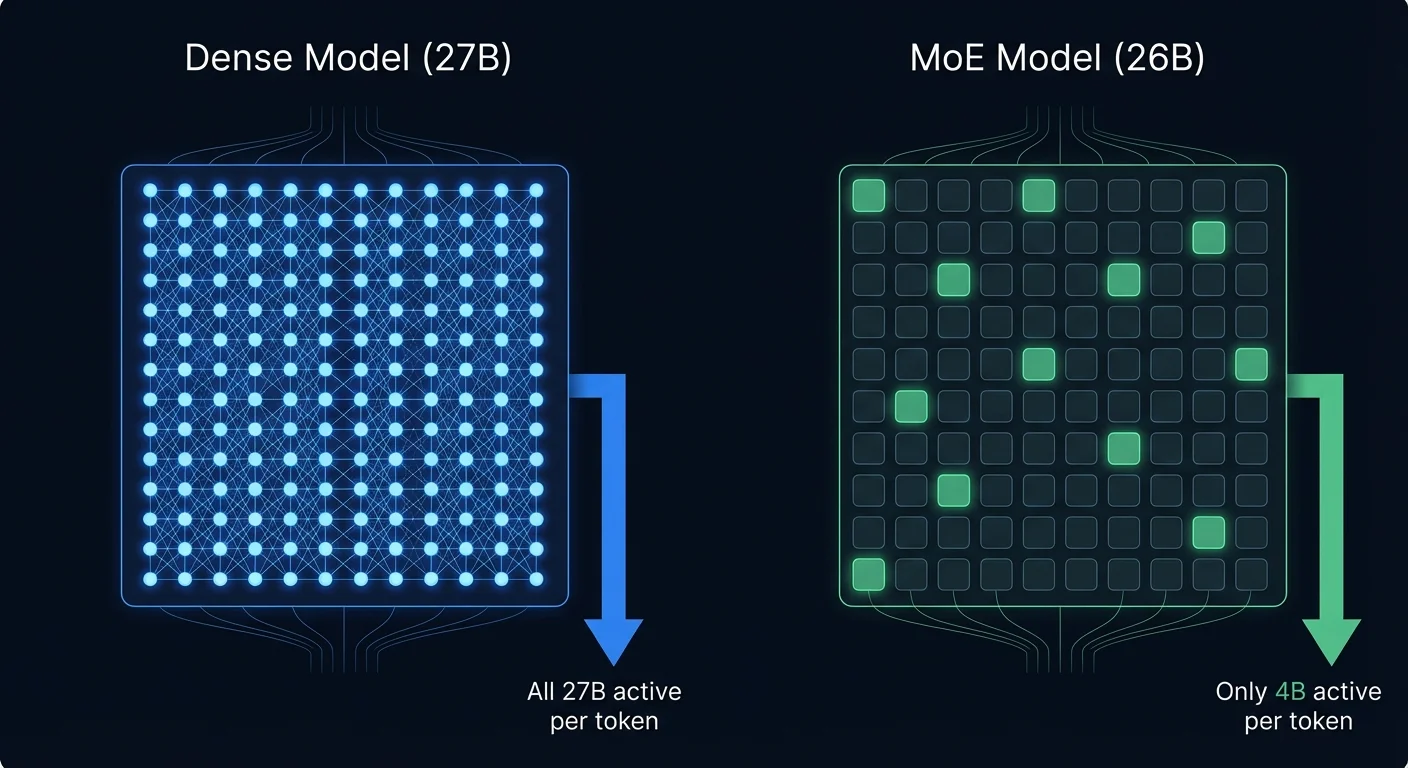
A dense model (Qwen 27B, Gemma 31B) uses ALL parameters per token — 27B weights computing every response. A MoE model (Gemma 26B) has 128 expert networks but only 8 activate per token — 4B doing work. All weights must be in GPU memory, but compute per token is 8x less. Same "size" on paper, completely different GPU reality.
Quantization — Why Q3 Beats Q4
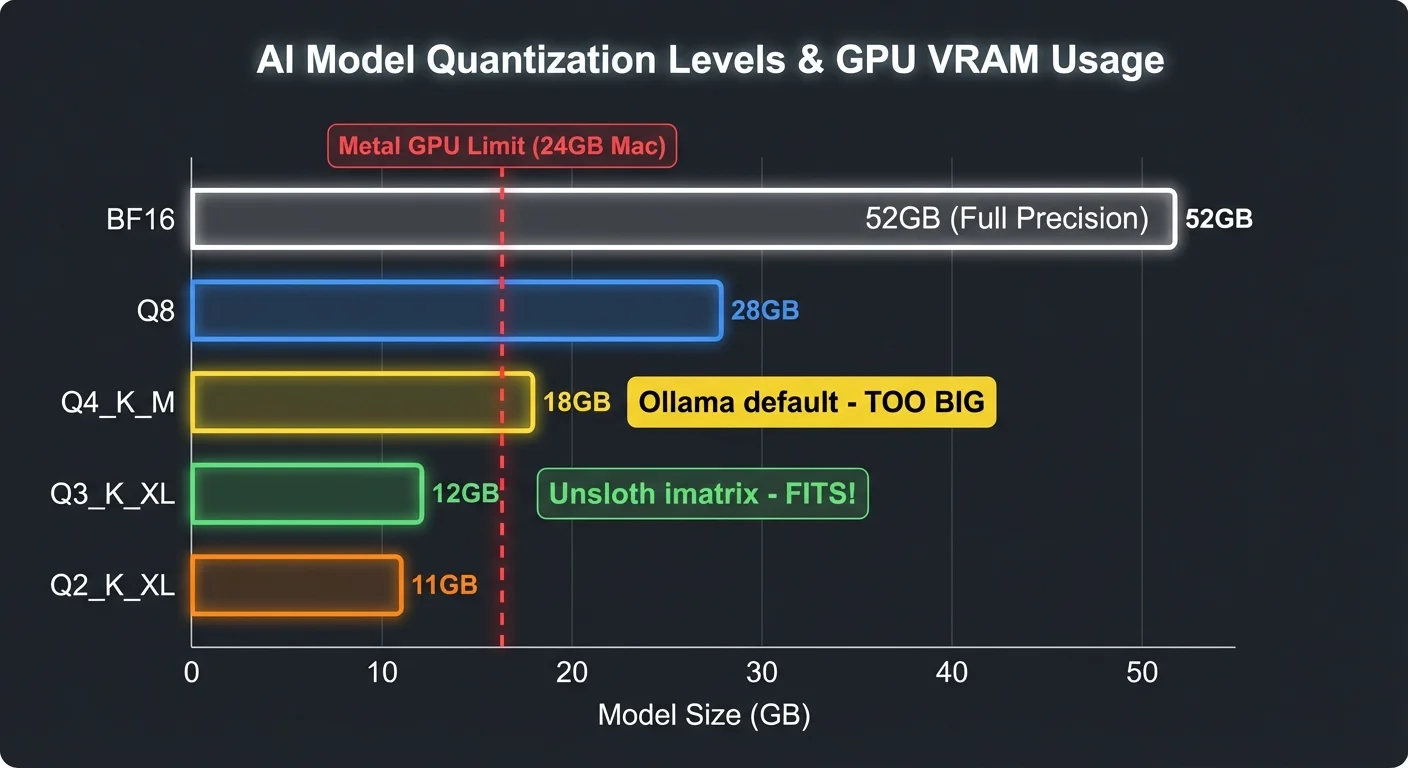
Ollama ships Q4_K_M (18GB) — exceeds the ~16GB Metal GPU limit on 24GB Macs. Unsloth's Q3_K_XL uses imatrix calibration: important weights keep higher precision, less critical ones get compressed harder. Result: 12GB at 4.09 bits per weight, nearly Q4 quality, fits with 3GB headroom.
Why Your Mac Gets Hot
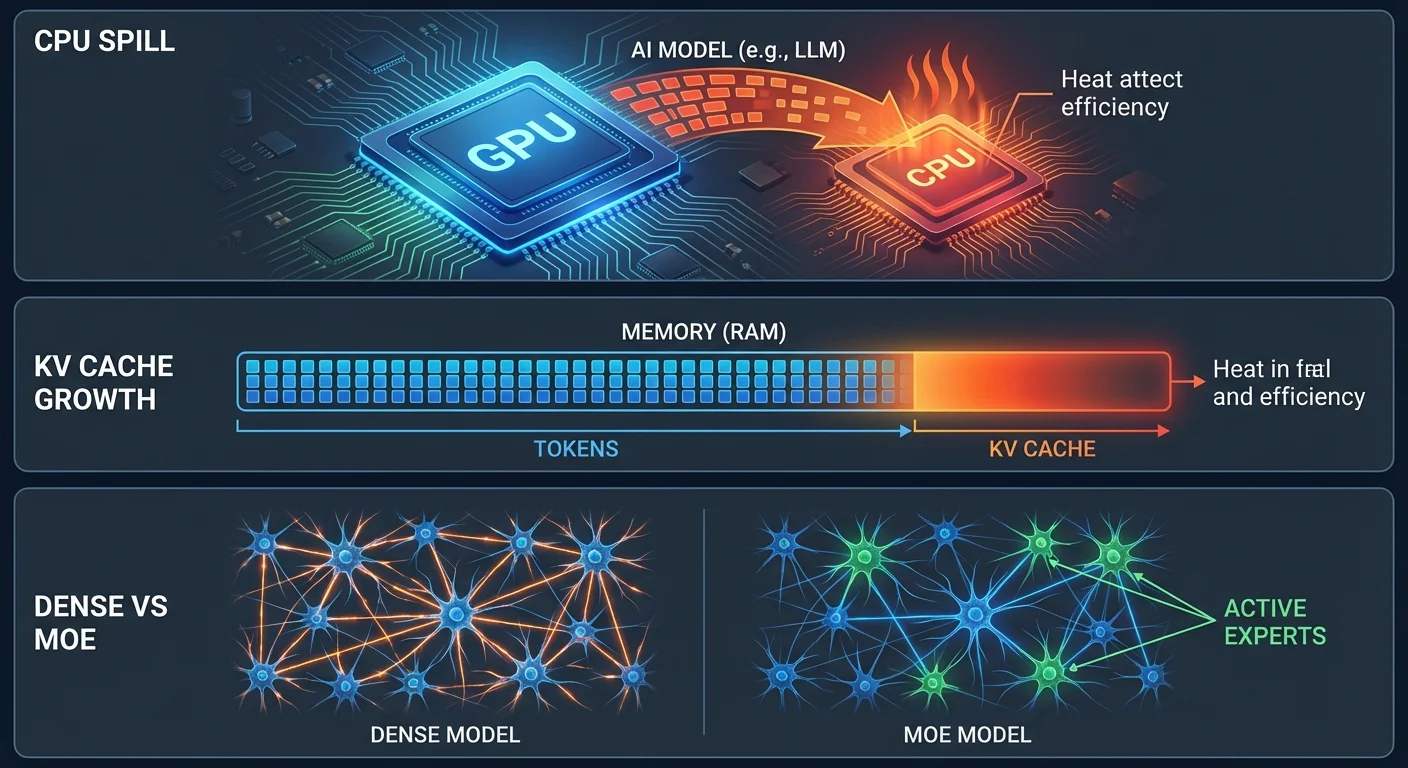
#1 CPU Spill: Model too big for GPU → overflow to CPU → 10-50x slower, much more heat. #2 KV Cache: 256K context = 22GB KV cache on top of model weights. Fix: -ctk q4_0 -ctv q4_0 -c 32768. #3 Dense vs MoE: Dense 31B computes 31B params/token. MoE 26B computes 4B. 8x less work = 8x less heat.
> Key Takeaways
- Don't trust "doesn't fit" claims. Q3_K_XL + KV quantization + flash attention turned "impossible" into 49 tok/s on 24GB.
- Ollama's conservative quant policy backfires. They only ship Q4_K_M to "protect quality" — but Q4 doesn't fit on 24GB. The result is 2 tok/s with swap thrashing.
- The model is great, the toolchain is broken. 3 separate Ollama bugs make Gemma 4 tool calling fail. Always test with llama.cpp before blaming the model.
- Unsloth makes this trivial.
curl -fsSL https://unsloth.ai/install.sh | shgives you a pre-built llama-server with all fixes. No cmake, no cherry-picks. - Generic tools beat specialized tools. Six tools (bash, read, write, edit, search, fetch) are more powerful than dozens of hardcoded ones.
- MoE models are fast. Only 3.8B parameters active per token — that's why 49 tok/s is possible despite "26B" in the name.
> Updated Scorecard
| Original (Ollama) | Now (llama.cpp) | |
|---|---|---|
| 26B Speed | ~2 tok/s | 49 tok/s |
| Tool Calling | Broken | Perfect |
| Rating | 2/10 | 8/10 |
| Verdict | "Skip on 24GB" | "My daily driver" |
The 26B was never the problem. Ollama was.